
The Seven Commands
What each spec-kit command reads, what it writes, and what it refuses to do — plus the three that sit outside the core sequence.
Seven commands form the sequence, and three more sit outside it. Nothing on this page is specific to any one project — this is the method as it ships.
1.3 The seven commands
After installation, your AI coding agent gains a set of slash commands. Seven of them form the sequence.
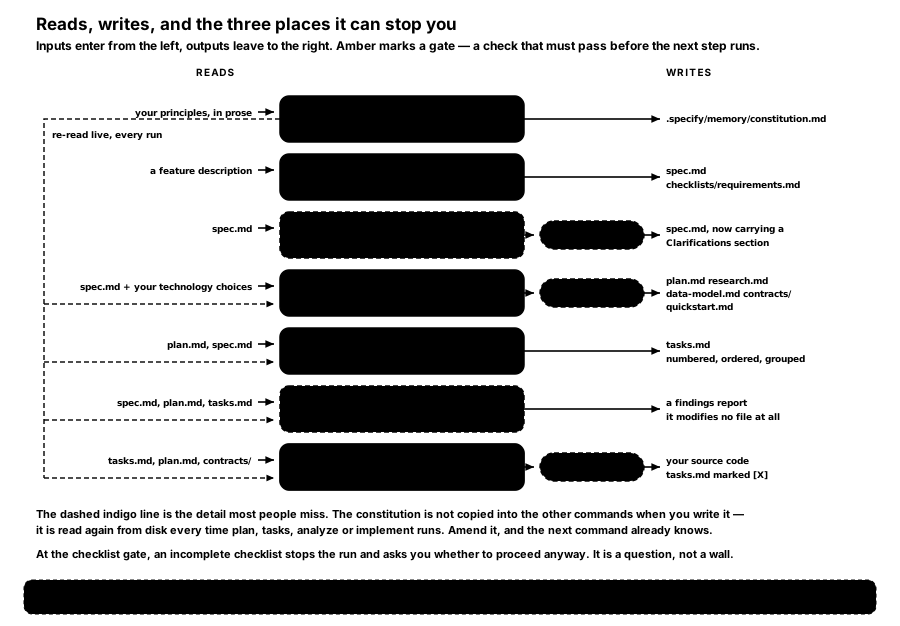
FIGURE 3 — Reads, writes, and the three places it can stop you. Amber marks a gate — a check that must pass before the next step runs.
/speckit.constitution — the principles, once
Reads your principles, in prose. Writes .specify/memory/constitution.md.
This is the only command you run once per project rather than once per feature. It captures the rules that hold across everything you build: quality standards, security requirements, review processes, whatever your organisation cannot trade away.
Principles are written to be testable. "The code should be well tested" is not a principle; "no implementation code is written before its test exists and fails" is. spec-kit's own guidance is explicit about replacing "should" with MUST or SHOULD plus a stated rationale.
The constitution is versioned with semantic versioning. Removing or redefining a principle is a MAJOR bump; adding one is MINOR; clarifying wording is PATCH. Amendments are dated. This matters more than it sounds: it means "we changed our minds about this in June" is a fact on the record rather than an argument.
It refuses to do anything else. Ask it to build a feature and it declines, and files the request under Next Actions instead.
/speckit.specify — what, and why. Never how.
Reads a feature description in plain language. Writes a numbered feature folder — specs/001-content-pipeline/ — containing spec.md and an auto-generated quality checklist at checklists/requirements.md.
spec.md has a fixed shape: prioritised user stories (P1, P2, P3), functional requirements numbered FR-001 onward and phrased as "System MUST…", key entities where data is involved, and measurable success criteria numbered SC-001 onward.
Two constraints on that file are worth knowing about, because they are what make it useful to a non-engineer.
User stories must be independently testable. Each story has to stand alone: implement only the first one and you should still have something viable. This is what makes incremental delivery real rather than aspirational.
Success criteria must be technology-agnostic. "Users can complete checkout in under three minutes" is a success criterion. "API response time is under 200ms" is not — it is an implementation detail wearing a success criterion's clothes. The distinction is enforced by the template.
It refuses to name a technology. No stack, no APIs, no code structure. The file is written for the person who wants the outcome, not the person who will build it.
Where the description is genuinely ambiguous, the command inserts at most three [NEEDS CLARIFICATION] markers, prioritising scope over security over user experience over technical detail. It is capped deliberately: a specification riddled with open questions is a sign the conversation should have happened first.
/speckit.clarify — optional, and worth it
Reads spec.md. Writes the same file back, with a ## Clarifications section recording each question and its answer, and the answer applied to the relevant section.
It asks up to five questions, one at a time, each answerable from a short multiple-choice list, and it recommends an option rather than leaving you to guess. It scans a fixed taxonomy — functional scope, data model, interaction flow, non-functional attributes, integrations, edge cases, constraints, terminology, completion signals — so the questions are the ones a careful engineer would have asked.
Five is a hard cap. The command is a gap-closer, not an interrogation.
It refuses to create a specification. If spec.md is missing it tells you to run /speckit.specify first.
/speckit.plan — now you may say how
Reads spec.md, your technology choices, and the constitution. Writes five things:
| File | What it holds |
|---|---|
plan.md | Technical context, and the Constitution Check |
research.md | Every decision as Decision / Rationale / Alternatives considered |
data-model.md | Entities, fields, relationships, validation rules, state transitions |
contracts/ | The interfaces — API endpoints, command schemas, output shapes |
quickstart.md | Runnable scenarios that prove the feature works end to end |
research.md is the file most people underestimate. Recording the alternatives that were rejected, and why, is what stops the same debate recurring every six months.
The Constitution Check is a gate. Before design proceeds, the plan is evaluated against the constitution, and again after the design is complete. A violation must either be resolved or justified in a Complexity Tracking table with the simpler alternative named and the reason it was rejected.
It refuses to write tasks.md. The command ends after design, on purpose — planning and decomposition are different jobs and conflating them produces worse versions of both.
/speckit.tasks — the build steps
Reads plan.md and spec.md, plus whichever of research.md, data-model.md, contracts/ and quickstart.md exist. Writes tasks.md.
Every task follows one format:
- [ ] T012 [P] [US1] Create the User model in src/models/user.pyT012 is the identifier. [P] means it can run in parallel with its neighbours. [US1] ties it to a user story. The file path is required — a task that says "create model" without saying where is rejected by the template as underspecified.
Tasks are grouped into phases: Setup, then Foundational work that blocks everything else, then one phase per user story in priority order, then polish. The ordering is what makes "ship user story 1 and stop" a real option.
Tests are optional and only generated if the specification asks for them or you request a test-first approach. spec-kit does not impose a testing philosophy; your constitution can.
/speckit.analyze — optional, read-only, and the one that earns its keep
Reads spec.md, plan.md, tasks.md and the constitution. Writes nothing at all.
It is strictly read-only, and it makes six passes: duplication, ambiguity, underspecification, constitution alignment, coverage gaps, and inconsistency. Findings come back as a table with a severity — CRITICAL, HIGH, MEDIUM, LOW — plus a coverage summary showing which requirements have no task against them.
One rule is absolute: a conflict with the constitution is automatically CRITICAL, and is resolved by changing the spec, plan or tasks — never by softening the principle.
This is the cheapest quality gate in the sequence. It runs in a minute and it catches the requirement everybody forgot to build.
/speckit.implement — the agent builds it
Reads tasks.md, plan.md, the contracts, and the constitution. Writes your source code, and marks each task [X] as it completes.
Before it writes anything it checks every file in checklists/ and produces a PASS/FAIL table. If any checklist is incomplete it stops and asks whether to proceed anyway. It is a question rather than a wall — but it is asked before the code exists, which is the point.
It works through the tasks in dependency order, running parallel-marked tasks together where it can.
1.4 Also in the box
Three more commands ship with spec-kit. They are useful, and they are not part of the core sequence.
/speckit.checklist generates a custom quality checklist for a domain — security, UX, performance, whatever you name. Its own description is the clearest statement of what it does: checklists are "unit tests for requirements writing". They test whether the requirements are well written, complete and unambiguous — not whether the implementation works. Items are written as questions about the specification: "Are the number and layout of featured episodes explicitly specified?" rather than "Verify the landing page displays three cards."
/speckit.converge compares the actual codebase against the spec, plan and tasks, and appends any remaining work to tasks.md as new tasks. It is append-only and never rewrites: if the code already satisfies everything, it leaves tasks.md byte-for-byte unchanged and reports convergence. This is the day-two command.
/speckit.taskstoissues turns the task list into GitHub issues. It requires the GitHub MCP server and refuses to run against a non-GitHub remote.
How is this guide?
Last updated on
Why Spec-Driven
What goes wrong when you prompt for code ad-hoc, and the idea that fixes it — specifications become the input to the thing that produces the code.
Setting It Up
Installing spec-kit, choosing your coding agent, what lands on disk and who owns it — and an honest account of when the method is not worth the overhead.