
Layer 2 · Context Engineering
Managing the desk — context window budgeting, just-in-time retrieval, schema-driven compaction, and scratchpad memory.
This layer owns: what the model sees. Its test: does quality hold up as conversations get long and usage gets real?
In plain English: Your brilliant hire does superb work when the right three documents are on the desk — and noticeably worse work when the desk is buried under forty, most of them irrelevant. They also forget everything overnight. So someone has to run the desk: fetch the right file at the right moment, clear away clutter, keep a tidy running summary of long conversations, and write important decisions in a notebook that survives the night. That job is context engineering.
What It Actually Is
Everything a model can consider in one request has to fit in its context window — its short-term attention span. Context engineering is the curation of everything inside it: the brief from Layer 1, plus retrieved documents, conversation history, memory, and tool results. What gets in, in what order, at what level of detail, refreshed when, and removed how.
The counterintuitive part: the window is a budget, not a bucket. Stuffing it doesn't just cost money — it costs accuracy, because the model's attention spreads thinner across everything present. Practitioners call the resulting decay context rot, and it's why systems that dazzle in a five-minute demo turn to mush in a forty-minute session. One more boundary worth drawing: this layer is not just "RAG" (the popular technique of retrieving documents for the model). Retrieval is one supply line into the window; context engineering also governs history, memory, summaries, and budgets — even in systems with no retrieval at all.
When This Layer Is Your Problem
- The long-session slump — Brilliant for ten turns, mediocre after forty. Nothing changed except how full the window got.
- Missed evidence — The answer was right there in the provided material — buried at position 14 of 20, and skimmed.
- Session amnesia — It asks for the order number it was given twenty minutes ago. The fact fell out of the window.
- Runaway cost — Every turn resends the entire history, so each conversation gets steadily more expensive.
- Stale-state reasoning — It answers Thursday's question from Tuesday's lookup, because nothing says when facts were true.
The Craft, in Four Moves
- Fetch just in time, admit very few. Don't preload everything the model might need; fetch what this step needs. A good retrieval path rewrites the conversational request into a real search ("still leaking after I descaled it" becomes "Presto espresso group-head leak after descaling"), searches wide, then re-ranks the candidates and admits only the best two or three — each labeled with its source and date so the model can prefer fresh, official information over a stale duplicate. Admission to the desk is the scarce resource.
- Budget the window, and defend the empty space. Give every section a cap — brief, tools, memory, retrieved documents, history — and reserve a large slice of deliberately empty headroom for the model's own thinking and answer (Figure 4). Position matters too: models pay the most attention to the beginning and end of what they read and skim the middle — researchers call it the lost-in-the-middle effect — so the stable brief leads, and the task plus the key facts sit near the end, right where the answer begins. A bonus of keeping the opening stable: AI providers charge far less to re-process an identical opening (prompt caching), so a tidy window is also a cheaper one.
- Summarize before you forget. When history grows past its cap, don't let the window silently truncate from the top — that deletes the oldest turns, which are often the most important ones (the order number, the customer's firm "no replacements"). Instead, replace old turns with a structured summary — a practice called compaction — written against a checklist that preserves exactly what casual summaries lose: established facts, decisions, open items, and an explicit do-not-re-ask list. Keep the last few turns word-for-word so the conversation still flows.
- Write things down. The window is for attention; storage is for retention. Give the system a scratchpad (working notes for the current task), plus longer-term memory for what happened before (episodic) and for stable facts like preferences (semantic). Trim verbose tool results to the few fields a decision needs, stamp them with an as-of time, and keep a pointer to the full record on disk. And when a sub-task would flood the desk — "read all forty manuals" — hand it to a sub-agent with its own fresh window that reports back a short brief. Quarantine the mess.
Watch It Work: The Summary That Saved Dana's Patience
By turn 19 of Dana's repair saga, the raw transcript is nearly 3,000 tokens and growing every turn. Here's the difference between hoping it all fits and managing it:
Before — Keep Everything, Lose Everything
[turn 3]  Dana: "It's the Presto machine from
          order NW-88231, bought June 20th."
[turn 7]  Dana: "No replacement, please — this
          is my THIRD unit. Repair or refund."
[turn 12] SupportPilot: "Could you send a photo
          of where it leaks?"
[turn 15] Dana: "Photo attached. Also I'm
          traveling next week — email only."
          … 14 more turns, growing forever …
Kept raw until the window overflows — then the oldest turns silently vanish first. At turn 41, the agent cheerfully offers Dana a replacement.
After — 18 Turns Become 420 Tokens, Forever
<session_summary turns="1-18">
customer: Dana M. · order NW-88231
  (Presto espresso machine, delivered
  Jul 2 — inside the 30-day window)
facts: powers on; leaks at group head;
  descaling per KB-208 already done
decisions: replacement REFUSED (3rd unit);
  wants repair or refund; email only —
  traveling next week
open: photo received, pending review;
  refund pre-approved to 100 USD if photo
  confirms defect (policy P-14)
do_not_reask: order no., purchase date,
  replacement preference
tone: frustrated by an earlier bot loop —
  keep replies short
</session_summary>
A summary written for the model's future self, against a checklist that forces the fragile stuff — decisions, constraints, open loops — to survive. The do_not_reask line alone prevents the classic infuriating repeat question.
Illustrative result in 40-turn sessions: repeated questions fell from 31% to 3%, history cost stopped growing, and Dana's "no replacements" survived every single audit.
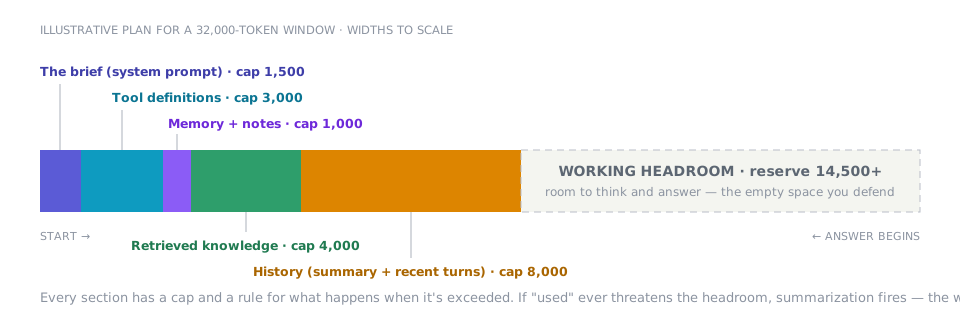
FIGURE 4 — The context window as a budget — allocated, not filled. The most important segment is the empty one. The most common real-world version of this chart has no caps and no headroom — which is why it isn't a chart, it's an incident report. Stable sections sit at the start (cheap to re-process); fresh, per-turn material sits near where the answer begins (where attention is strongest).
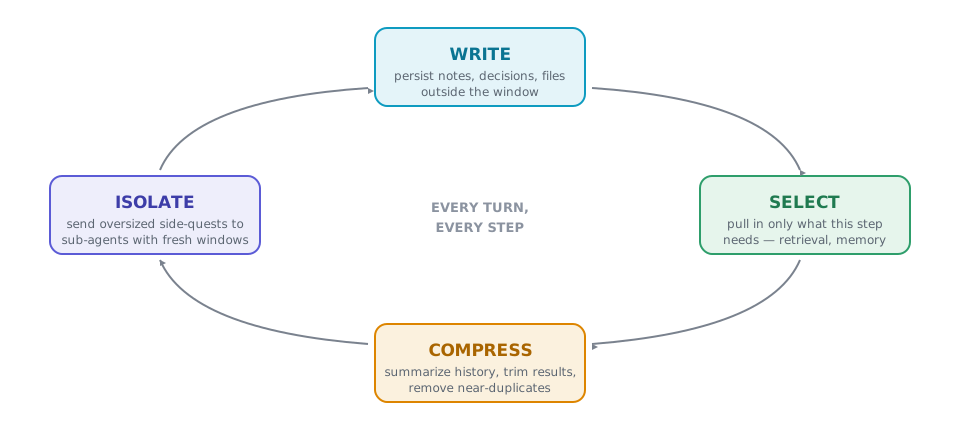
FIGURE 5 — The context cycle — four verbs, every turn. Classic RAG only runs SELECT. Raw chat history only accumulates. Healthy systems run all four verbs continuously: get information safely out of the window, bring back only what's needed, keep what's inside dense, and quarantine anything that would flood the desk.
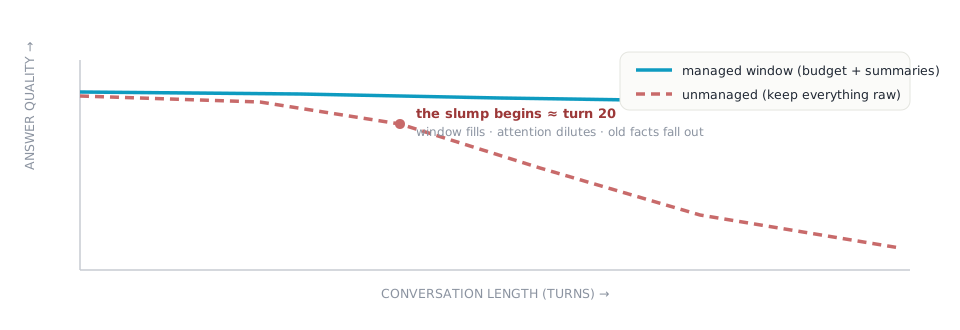
FIGURE 6 — Context rot — the chart that reveals this layer. Single-question tests can't see this layer at all — both systems look identical at turn one. Chart quality against conversation length and the difference appears. A flat line is the signature of good context engineering. (Qualitative and illustrative.)
Watch Out For
- Context hoarding — "More context can't hurt." It does — attention dilutes, cost climbs, quality slides as usage grows.
- Fix: caps, just-in-time fetching, and a defended headroom floor.
- The retrieval landfill — Top-20 search results dumped in, three of them near-duplicates, the right one ranked 14th — and skimmed.
- Fix: search wide, re-rank hard, admit two or three, label each with source and date.
- Goldfish sessions — Nothing is written down, so eviction equals amnesia — settled questions get re-asked and re-litigated.
- Fix: a scratchpad plus structured memory, with an explicit do-not-re-ask list.
- Summarize-and-forget — A casual summary keeps the story and drops the one hard constraint ("email only"). Thirty turns of good behavior, undone.
- Fix: summarize against a schema, then spot-check summaries with questions against the original.
How You Know It's Working
Three instruments. First, the chart in Figure 6: quality plotted against conversation length — flat is the goal. Second, groundedness: what share of factual claims in answers can be traced to material that was actually on the desk (a second model can audit this). Third, cost per resolved task and per-section token counts against their caps. If you only ever measure single-question accuracy, this entire layer is invisible to you.
- Every section of the window has a cap and an over-cap rule
- A headroom floor is reserved — breaches trigger summarization, never silent loss
- Retrieval re-ranks and admits few, with source and date attached
- Summaries follow a schema; decisions and constraints always survive
- A do-not-re-ask list exists and is honored
- Tool results enter trimmed, time-stamped, with a pointer to the full record
- Oversized side-quests run in sub-agents that report back briefs
- You chart quality against conversation length, not just per-question accuracy
v1 → v2 — SupportPilot gets eyes and a memory. Budgeted retrieval, schema-driven summaries, trimmed tool results. Answers become grounded in Northwind's actual manuals and policies — and stay sharp at turn sixty. Dana stops repeating herself. But the agent still can't do anything. On to Layer 3.
How is this guide?
Last updated on