
Node-Level Reference
Technical reference for whoever builds, reviews or maintains the workflow — node types, WordPress authentication, operational notes, and screenshot capture guidance.
For whoever builds, reviews or maintains this workflow.
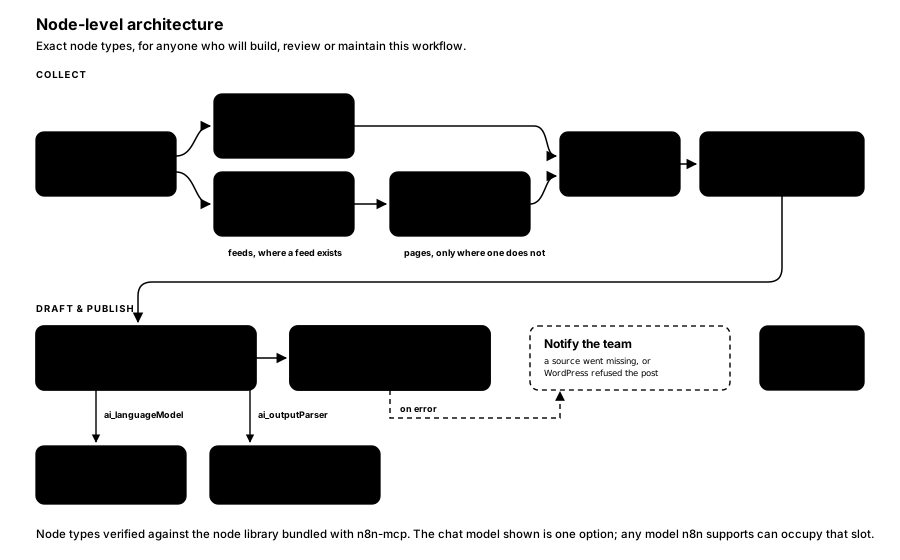
FIGURE 9 — Node-level architecture.
For the same graph drawn as the n8n canvas, alongside the workflow JSON it corresponds to, see The Workflow Artifact.
Nodes
| Stage | Node | Type |
|---|---|---|
| Trigger | Schedule Trigger | n8n-nodes-base.scheduleTrigger |
| Collect | RSS Read | n8n-nodes-base.rssFeedRead |
| Collect | HTTP Request | n8n-nodes-base.httpRequest |
| Collect | HTML Extract | n8n-nodes-base.html |
| Collect | Merge | n8n-nodes-base.merge |
| Collect | Remove Duplicates | n8n-nodes-base.removeDuplicates |
| Draft | AI Agent | @n8n/n8n-nodes-langchain.agent |
| Draft | Chat model (sub-node, ai_languageModel) | e.g. @n8n/n8n-nodes-langchain.lmChatAnthropic |
| Draft | Structured output parser (sub-node, ai_outputParser) | @n8n/n8n-nodes-langchain.outputParserStructured |
| Publish | WordPress | n8n-nodes-base.wordpress |
Node types verified against the node library bundled with n8n-mcp. The chat model is one option among several — any model n8n supports can occupy that slot.
Authentication
WordPress offers two credential types in n8n: wordpressApi (username plus application password) and wordpressOAuth2Api.
Prescribed: wordpressApi with an application password, issued to a dedicated WordPress account created for this purpose, holding the minimum role that can create posts. Application passwords are revocable individually without disturbing any human user's login, and scoping to a service account means the audit trail shows plainly which posts came from the pipeline.
Requirements: the WordPress REST API must be reachable from wherever n8n runs, and application passwords must be enabled (they are by default on current WordPress, but some security plugins disable them).
Operational notes
- Deduplication state persists between runs. Confirm the retention window — long enough to avoid re-drafting last week's story, short enough not to grow unbounded.
- Scheduling. The workflow arrives inactive on deployment and must be activated deliberately.
- Error branch notifies rather than failing silently. Nominate the recipient.
- Rate limits apply on both the AI model and the WordPress REST API. At one run per day neither is a concern; at hourly cadence, both need checking.
- Credential rotation. The application password and model API key should be on whatever rotation schedule your policy requires; both can be replaced without rebuilding the workflow.
Screenshots to capture after build
Three screenshots complete this reference once the pipeline exists. Do not substitute mock-ups or stock images — an invented screenshot of a system that does not exist is the fastest way to lose a reader's trust in the rest of the document.
Capture at 1600px wide minimum, on a light background.
| What to capture | Notes |
|---|---|
| The completed workflow open in the n8n editor | Zoom so every node and connection is visible in one frame. Collapse the left sidebar. Make sure no credential names or instance URLs are legible. |
| WordPress Posts → Drafts, with at least one pipeline-generated article waiting | Use a realistic headline, not "Test post 1". Crop out the admin bar if it shows the live site domain. |
| One generated draft open in the WordPress editor | Show the headline, the opening paragraphs, and the tags/categories panel — this is what the reviewer actually sees. |
Before sharing externally
- No API keys, tokens or application passwords visible anywhere in frame
- No internal hostnames, IP addresses or instance URLs legible
- No real customer or third-party data in sample content
- Author account name is the service account, not a personal login
- Browser profile avatars and bookmark bars cropped out
How is this guide?
Last updated on
Running It and Editorial Control
Day-two operation — cadence, failure modes, cost and change — plus the editorial risks that actually matter: accuracy, attribution, source permissions and brand drift.
The Workflow Artifact
What the build prompts actually produce — the n8n canvas layout and the workflow JSON, showing where the writer's prompt sits and how the agent's sub-nodes attach.