
Layer 1 · Prompt Engineering
Writing the brief — framing the task, setting role boundaries, shaping the output contract, and eliminating ambiguities.
This layer owns: what you say. Its test: given one clean request with perfect inputs, does the model reliably do the right thing?
In plain English: Think about the difference between handing your brilliant new hire a sticky note — "deal with the customer emails, be nice" — and handing them a one-page brief: here's your role, here's what "done" looks like, here's what you may decide yourself and what goes to a manager, here's an example of a great reply, and here's the exact format we file responses in. Same employee, wildly different results. Prompt engineering is learning to write that one-page brief.
What It Actually Is
A prompt is every instruction inside a single request: how the task is framed, what role the model plays, which rules bind it, which examples teach it the boundaries, and — crucially — what shape the answer must take. It is not retraining the model (you change words, not the model itself), and it is not deciding which documents get attached to the request (that's the next layer). It's the part where your intent lives.
The single most useful mindset: a model fills every gap you leave with a plausible guess. Prompt engineering is the systematic removal of gaps — especially the ones you didn't know you'd left. Most "the AI went rogue" stories are really "the brief never said what to do in this situation."
When This Layer Is Your Problem
- Format roulette — Every reply comes back shaped a little differently — and whatever reads it downstream breaks on one answer in ten.
- The adjacent answer — It answered a reasonable question. Just not quite the one you asked.
- Confident guessing — On edge cases it improvises instead of following policy — or instead of simply asking.
- Filler before substance — Three sentences of throat-clearing before (or instead of) the actual deliverable.
- Personality drift — Warm on Monday, corporate on Tuesday. The tone was never pinned down, so it wanders.
The Craft, in Four Moves
- Give it a job, not a vibe. "You are a helpful assistant" selects the blandest possible behavior. A working brief names the role and its limits (SupportPilot, support agent for Northwind, writing replies a human reviewer approves), defines what "done" means, and — this is the part almost everyone skips — spells out the unhappy paths: what to do when information is missing, when the request is out of scope, when policy blocks the obvious answer. If a branch has no instructions, the model will invent some.
- Show, don't just tell. A few worked examples (few-shot examples, in the jargon) teach more than paragraphs of description — but only if you pick them like test cases. The valuable examples sit on the boundaries: the politely-worded message that's secretly urgent, the complaint that's actually a question. And examples must match your required format exactly, because when instructions and examples disagree, the model follows the examples — silently.
- Decide the shape of the answer. Treat the response format as a contract: name the sections, cap the lengths, list the allowed values, and specify what the output looks like when the answer is "I need more information." Wrap any pasted material (a customer email, a policy excerpt) in clearly labeled markers so the model can tell your instructions from the material — and can never mistake text inside a customer's email for an order from you.
- Tell it which checks to run. For judgment-heavy tasks, name the verification you want before the answer: "confirm the purchase date is within 30 days before approving." You can even ask the model to review its own draft against the rules and fix problems before responding. It's a light-duty version of the quality control we'll build properly in Layer 4 — and it's nearly free.
Watch It Work: SupportPilot v0 → v1
Below is the actual upgrade. You don't need to read every line of the right panel — skim the section headers and notice how much got decided.
Before — The Sticky Note
You are a helpful customer support
assistant for Northwind. Read the
customer's message and write a
helpful, friendly response.
Be professional.
Reads fine. Decides nothing: no limits, no format, no edge cases, no definition of "helpful." Every gap becomes a guess.
After — The One-Page Brief (abridged)
You are SupportPilot, a support agent for
Northwind, an online kitchenware retailer.
You write replies a human reviewer approves.

## Your job
Resolve the ticket in one reply when possible.
You handle: orders, returns, refunds, product
questions. Anything else (legal, press,
injuries): escalate.

## Rules
1. Use only facts from the ticket and the
   provided policy excerpts. Missing a fact?
   Ask for exactly that fact — nothing else.
2. Refunds: approve up to 100 USD for damaged,
   undelivered, or wrong-item (policy P-14).
   Above that, or other reasons: escalate.
3. Never claim an action was taken. You draft;
   systems act later.
4. Any injury or safety mention: escalate.
5. Tone: plain and warm. No exclamation marks,
   no corporate filler.

## Output — exactly two blocks
<customer_reply> max 120 words </customer_reply>
<internal>
  action: resolve | need_info | escalate
  reason: one sentence
  refund_usd: number (0 if none)
</internal>
Every failure mode above now has a home: the format is fixed, guessing is banned, missing info and escalation are first-class outcomes, and a reviewer can scan the internal block instead of re-reading prose.
Illustrative result on a 200-ticket test set: replies in the correct format jumped from 61% to 98%, and policy slip-ups fell by two-thirds. Resolution rates barely moved, though — v1 still can't look anything up. That's the next layer's job.
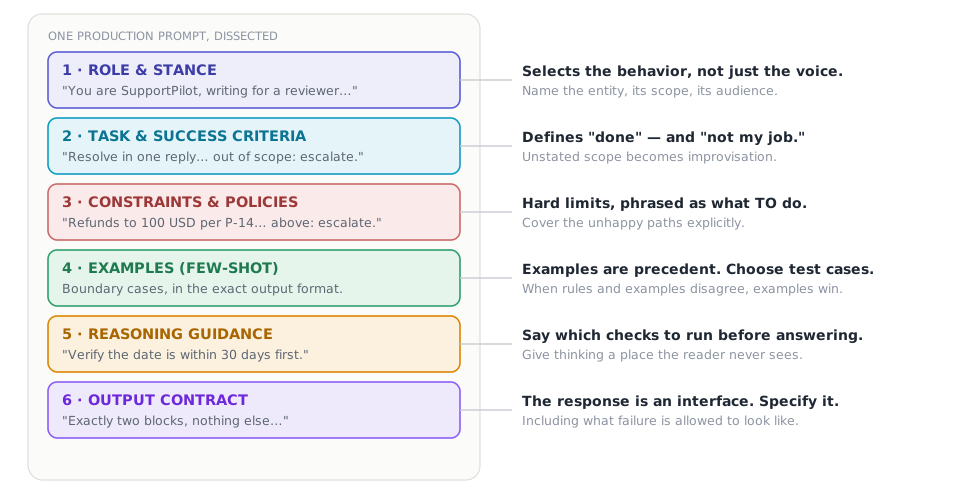
FIGURE 3 — Anatomy of a great prompt — six parts that carry the load. Not every prompt needs all six at full strength — a quick one-off can skip the examples. But when a prompt misbehaves, the cause is almost always one of these six missing, vague, or quietly contradicted by another one.
Watch Out For
- The kitchen-sink prompt — Every incident got a patch; none got a review. Two thousand lines later, rules contradict each other and behavior changes at random.
- Fix: treat the prompt like code — group, dedupe, resolve conflicts, version it, and test every change.
- Walls of "never" — Prohibitions say where not to stand, not where to stand — and long NEVER-lists actually erode compliance.
- Fix: rewrite each "don't X" as the behavior you want instead. Keep true hard bans few and truly hard.
- Vibes instead of specs — "Be concise" produces five paragraphs, because "concise" isn't testable.
- Fix: numbers and shapes — "120 words max," "one question only," "exactly two blocks."
- Examples that contradict the rules — The rules changed; the examples didn't. The model follows the examples, silently.
- Fix: regenerate examples whenever the format changes, and check them automatically.
How You Know It's Working
Keep a golden set — one to three hundred real inputs with known-good properties — and run it on every prompt change, exactly like a software test suite. Track the share of outputs in the correct format, per-rule compliance (was the policy cited when money moved?), and accuracy where labels exist. Compare two prompts only on the same inputs. A prompt change without a test run is a guess wearing a lab coat.
- The role names the entity, its scope, and its audience
- "Done" and "not my job" are both defined and testable
- Every branch has instructions — including missing-info and out-of-scope
- The output format is a contract, unhappy path included
- Pasted material sits inside clearly labeled markers
- Examples match the current format and pin the boundary cases
- Rules are phrased as what to do, not only what to avoid
- The prompt is versioned, and every change runs the golden set
v0 → v1 — SupportPilot gets a real brief. Replies become consistent, checkable, and policy-aware. Dana gets a clear, warm answer in the right shape — about facts the model still can't verify. It needs eyes. On to Layer 2.
How is this guide?
Last updated on
The Four Layers of LLM Engineering
A friendly, visual field guide to prompt engineering, context engineering, harness engineering, and loop engineering — for technical and non-technical readers alike.
Layer 2 · Context Engineering
Managing the desk — context window budgeting, just-in-time retrieval, schema-driven compaction, and scratchpad memory.