
The Pipeline, Prescribed
The prescribed design — decisions to lock before building, then the three automated stages: watch the sources, draft the article, file it as a draft for approval.
This page sets out what gets built. It is written as a specification, not a menu: each stage states the prescribed approach, and an explicit Avoid where a tempting alternative causes problems.
What we are building
A workflow that runs on a schedule, gathers what is new from your chosen sources, drafts one article from what it finds, and files that article on your website as a draft for a person to approve.
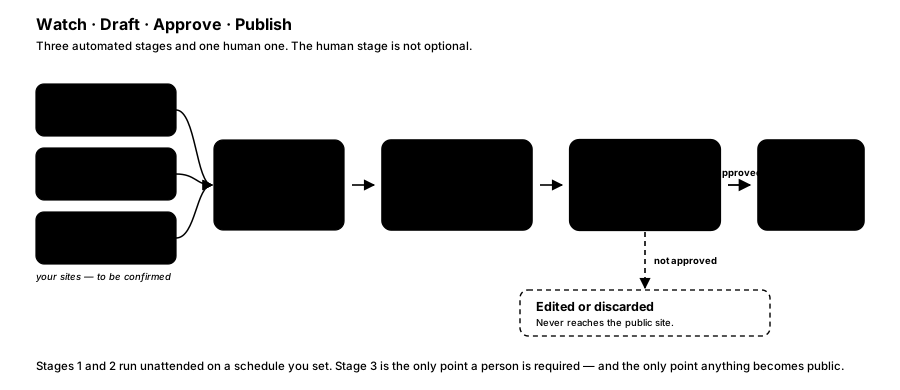
FIGURE 8 — Watch, draft, approve, publish.
Three stages are automated. One — approval — is not, by design.
Decisions to lock before you build
Each has a prescribed default. Where you accept the default, the build proceeds; where you do not, say so and the design adjusts.
| # | Decision | Prescribed default | Status |
|---|---|---|---|
| 1 | Which source sites, and how each is read | RSS where a feed exists; direct page reads only where one does not | Decide before build — blocking |
| 2 | Permission to read those sites automatically | Confirm each site's terms of service permit it before building against it | Decide before build — see source permissions |
| 3 | Website access | Self-hosted WordPress, application-password authentication, dedicated least-privilege account | Decide before build — blocking |
| 4 | How often it runs | Once daily, early morning, so drafts are waiting at the start of the day | Assumed |
| 5 | Which AI model, and whose account | A current-generation model on an account you own, so you control spend and data | Decide before build |
| 6 | House style | Codify your existing style guide into the writer's instructions; if none exists, draft one for approval | Decide before build |
| 7 | Categories, tags, author, images | AI suggests categories and tags; author set to a named service account; no automatic images | Assumed |
| 8 | Source attribution | Every draft cites and links its sources | Assumed — recommended, see attribution |
| 9 | Where n8n runs | n8n Cloud, unless you have a reason to self-host | Assumed |
Assumption — Items 4, 7, 8 and 9 are written throughout this guide as though the default holds. Each is a single change if it does not.
Stage 1 — Watch the sources
Prescribed. A schedule trigger fires the workflow at the agreed cadence. For each source that publishes an RSS feed, an RSS node reads it directly. For sources with no feed, an HTTP request fetches the page and an HTML extract node pulls out the parts that matter. Results from all sources merge into one stream, and a de-duplication step drops anything already processed in an earlier run, keyed on the article's canonical URL.
Why RSS first. A feed is a published, stable interface — the site owner intends it to be read by machines. Reading the page directly means depending on that page's HTML structure, which changes without warning and takes the pipeline down silently when it does.
Avoid: reading a page directly when the site publishes a perfectly good feed. It is more work to build, more fragile in operation, and more likely to raise objections from the source.
Assumption — de-duplication keys on canonical URL. If your sources syndicate the same story under multiple URLs, a content-similarity check will be needed instead; flag this if you expect it.
Stage 2 — Draft the article
Prescribed. An AI agent node receives the gathered sources as structured input and produces one article. Its instructions carry your house style, target length, and required structure. A structured output parser sits alongside it so the result arrives as separate fields — headline, body, suggested tags — rather than one block of text.
Why structured output. If the writer returns free-form prose, something downstream has to pull the headline out of it by pattern-matching, and that breaks the first time the model formats its answer slightly differently. Declaring the shape up front makes the boundary reliable.
The writer's instructions — prompt P1. This is the single highest-leverage piece of text in the pipeline: it is written once and then shapes every article the system ever produces. The prescribed shape is below — the bracketed parts are filled from your style guide (decision 6 above). The prompt map takes it apart block by block.
You are a staff writer for [CLIENT NAME]. You will receive several
source articles covering a related story.

Write ONE article that synthesises them. Do not summarise any single
source, and do not stitch the sources together in sequence.

Voice and format
- [House voice, taken from your style guide]
- 600–800 words
- Open with why this matters to [your audience], not with what happened
- A subheading every 200–300 words

Rules
- Attribute every factual claim to the source it came from
- Where sources disagree, say so rather than silently picking one
- Where something cannot be confirmed from the sources, say so
- Never invent quotes, figures, names or dates
- If the sources do not support an article worth publishing, return
  status "skip" with a one-line reason instead of writing one anyway

Return separately: headline, standfirst, body, suggested tags, and the
list of source URLs used.
The skip instruction in that last rule is deliberate and worth keeping. Without it, a thin news day still produces an article, because the model has been asked for one — and thin articles are exactly what erodes a publication's credibility over months. Better an empty drafts folder than a padded post.
Avoid: free-text output parsed downstream with pattern matching. It works in testing and fails in production.
Avoid: prompting the writer to produce publication-ready copy that "needs no editing". It sets the wrong expectation for reviewers, who then skim rather than read.
Stage 3 — File it as a draft
Prescribed. A WordPress node creates the post with status: draft, using a dedicated WordPress account with the minimum role required to create posts, authenticated with an application password. Categories and tags come from the writer's suggestions. The post appears in your normal WordPress drafts list, and your team reviews it in the editor they already use every day.
Why the review gate lives in WordPress rather than in the workflow. It needs no extra integration, no paused workflow waiting for a reply, and no new tool for your team to learn. The draft simply exists, and publishing is the same action it has always been.
Why review is not optional here. The guidance shipped with n8n-skills singles out exactly this situation — an action taken on someone's behalf, triggered by a schedule rather than by a person — as the case that warrants human approval by default. A schedule-triggered publisher with no gate can put an error in front of your audience at 6am with nobody aware it happened.
Avoid:
status: publishon a schedule-triggered workflow. If you later decide you want it, document the risk explicitly and make that call knowingly — but it is not the shape to build first.
How is this guide?
Last updated on
The Tooling
Why general-purpose AI cannot build n8n workflows reliably, and how n8n-mcp and n8n-skills close the gap — with a clear separation between build time and run time.
Building It by Prompt
The actual prompts used to find nodes, assemble the workflow, validate it, deploy it inactive, and change it later — plus the prescribed build order.