
The Anatomy — Two Folders and a Round Trip
The whole mental model on one page — what is true, what you are proposing, the four artifacts inside a change, and the four states OpenSpec reports.
Everything in OpenSpec is built from a small number of ideas, and the rest is detail. This page is those ideas. Nothing on it is specific to any one project.
2.1 Two folders
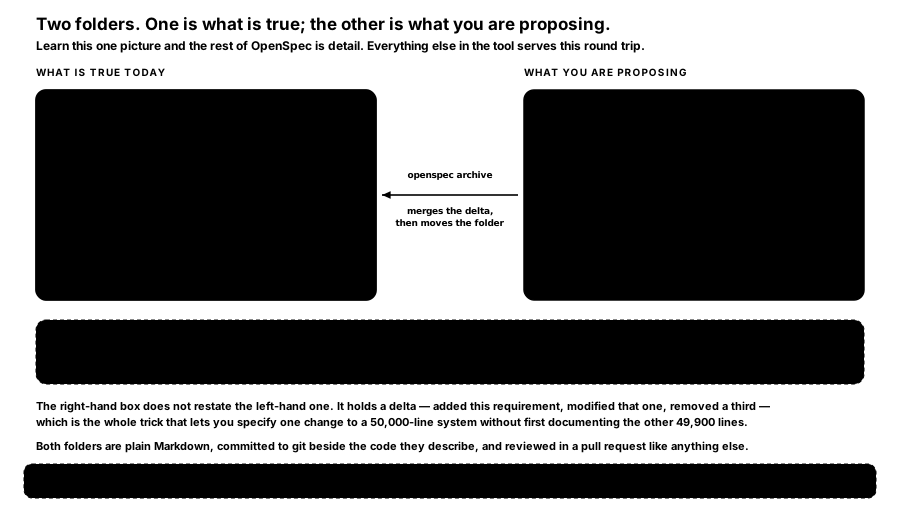
FIGURE 8 — Two folders. One is what is true; the other is what you are proposing. Learn this one picture and the rest of OpenSpec is detail.
openspec/specs/ is the source of truth. It describes how your system behaves right now, organised by domain — auth/, payments/, ui/. It is made of requirements ("the system SHALL expire sessions after 30 minutes") and scenarios (concrete when/then examples). It is the single agreed answer to "what does this software do?"
openspec/changes/ is what you are proposing. When you want to add, modify or remove behaviour, you create a change: one folder holding everything about that work. A proposal, delta specifications, a design and a task list. One change, one folder, one feature.
Archiving folds one into the other. When the work is done you archive the change: its delta specifications merge into the main specifications, and the folder moves to changes/archive/ with a date stamp. Your specifications now describe the new reality and you are ready for the next change. The cycle closes.
That third sentence is the whole reason this section exists. Two folders and a merge step is not a complicated idea, but it is the mechanism that keeps a specification true past its first month.
2.2 The five ideas, stated plainly
- Specifications are the truth. They describe behaviour now, not intent then.
- A change is one unit of work, packaged as one folder.
- Delta specifications describe what is changing, not the whole world. This is the trick that makes the tool good at editing existing systems rather than only green-field ones.
- Artifacts build on each other in a natural order, and you can revisit any of them at any time.
- Archiving folds the change back into the truth, which closes the loop.
2.3 The four artifacts, and what depends on what
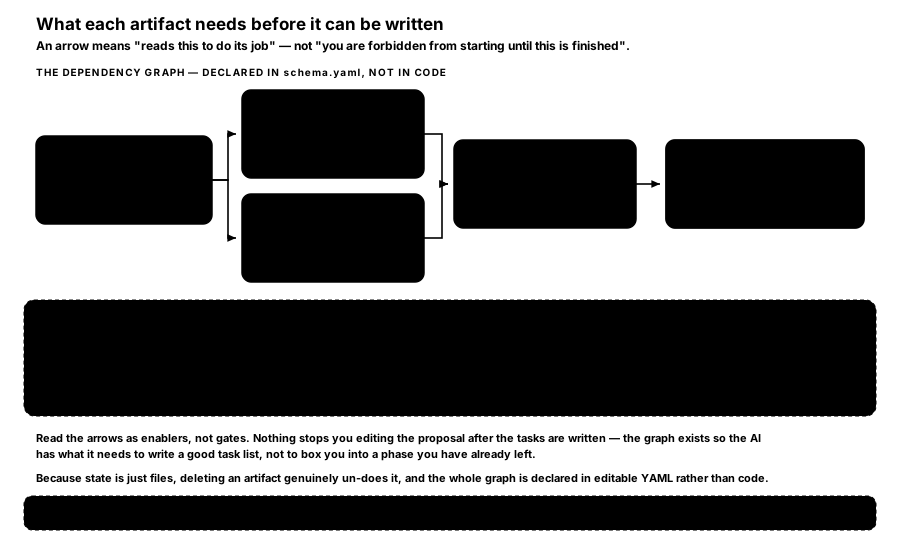
FIGURE 9 — What each artifact needs before it can be written. An arrow means "reads this to do its job" — not "you are forbidden from starting until this is finished".
| Artifact | What it holds | Requires |
|---|---|---|
proposal.md | Why this change, what changes, which capabilities, what it affects | nothing |
specs/**/*.md | What the system must do, written as a delta, testably | proposal |
design.md | How — decisions, alternatives rejected, risks and trade-offs | proposal |
tasks.md | The numbered build steps, as checkboxes | specs, design |
| (the apply step) | Where code gets written; it tracks tasks.md | tasks |
Notice that specs and design both depend only on proposal, so either can be written first. That is a real property of the graph rather than a diagram simplification.
design.md is optional, and that is a deliberate escape hatch. OpenSpec's own schema names the conditions under which it is worth writing: a cross-cutting change touching several modules, a new architectural pattern, a new external dependency, significant data-model changes, security or performance or migration complexity, or ambiguity that benefits from a decision being made before coding. For a small change it can be brief, and that is fine — not every change needs deep design discussion.
2.4 The four states, and why there is no state file
openspec status prints one of four markers against each artifact:
| Marker | State | What it means |
|---|---|---|
[-] | blocked | Something it reads is not written yet |
[ ] | ready | Everything it needs already exists |
[x] | done | The file exists on disk |
[~] | skipped | The change declared it has no spec-level behaviour change |
Completion is decided by asking the filesystem whether the artifact exists. There is no state file, nothing to keep in sync, and nothing that can disagree with reality. A consequence worth knowing: deleting an artifact genuinely un-does it, and the next status will say so.
Skipped artifacts are excluded from the progress count, so a change that legitimately has no specification work does not report as permanently incomplete.
2.5 Where the graph itself comes from
The dependency graph is not compiled into the tool. It is declared in a schema.yaml file, and the built-in default is called spec-driven — described in its own header as "Default OpenSpec workflow - proposal → specs → design → tasks".
Each artifact in that file declares an id, what it generates (a path or a glob), a description, a template, a long instruction telling the AI what a good one looks like, and what it requires. The file ends with an apply block naming what apply needs and which file it tracks.
Two consequences follow, and both matter more than they first appear:
Templates are ordinary Markdown, so editing one changes the AI's output immediately — no rebuild, no reinstall, no version bump.
You can fork the whole workflow. openspec schema fork spec-driven my-flow copies it; then add an artifact, remove one, or rewire what depends on what. A team that wants a review artifact between design and tasks adds one, and the graph re-sorts itself. This is covered further in the artifacts and in the greenfield page.
Schema resolution runs project first, then a per-user directory, then the built-ins — so a project-local schema of the same name wins. Which schema a given change uses is decided by --schema if passed, then the change's own .openspec.yaml, then openspec/config.yaml, then the spec-driven default.
How is this guide?
Last updated on
Why OpenSpec
What goes wrong when you prompt for code ad-hoc, why rigid phase gates fail differently, and where OpenSpec sits against spec-kit, Kiro and doing nothing.
The Command Line
Every OpenSpec terminal command, grouped by the job it does — set-up, browsing, validation, the lifecycle, the workflow engine, configuration, and the beta surface.