
Diagnostics & Glossary
Diagnose before you patch — diagnostic decision tree, symptom lookup table, SupportPilot metrics, and LLM engineering glossary.
Diagnose Before You Patch
The four layers are separable for diagnosis but inseparable at runtime — every trip around the loop rebuilds the desk, every desk holds a brief, every action passes the gate.
Some things even live in shared custody. A tool description is brief-writing that ships inside the office. A summary is a desk decision, implemented by office code, triggered by the loop. That's fine — as long as you fix each thing under the discipline of the layer whose failure it's exhibiting. Which brings us to the single most valuable habit in this guide: when output is bad, resist the urge to immediately rewrite the prompt. The prompt is merely the easiest file to edit — which is exactly how kitchen-sink prompts grow rules like "NEVER call the order tool twice," quietly absorbing blame for a slow tool. Diagnose first.
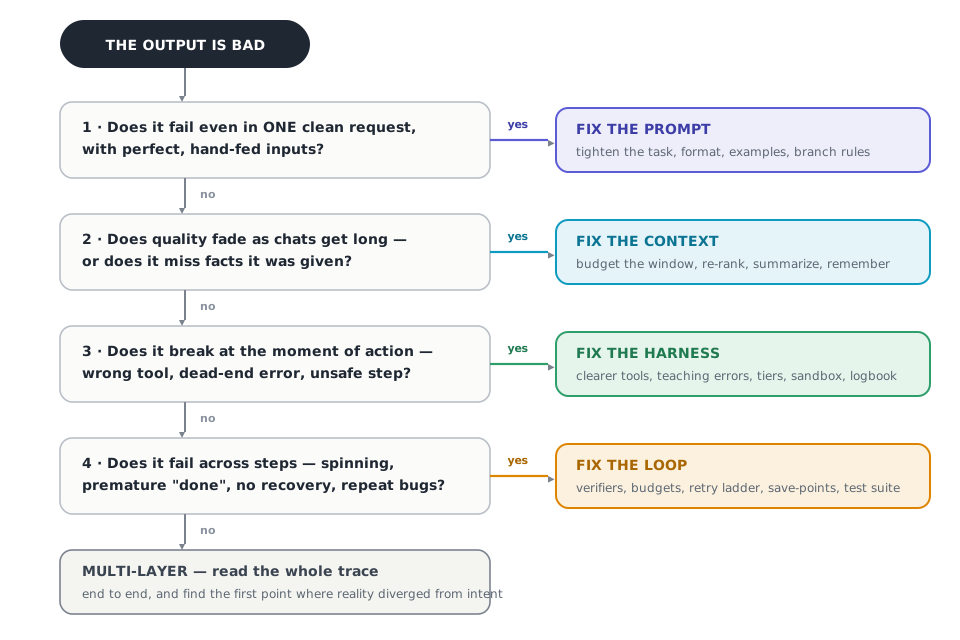
FIGURE 11 — "Something's wrong — which layer do I fix?". Question 1 is the whole trick. It strips away everything except the brief — if the failure survives that stripping, no amount of retrieval tuning or loop design will save you. Each later question adds one layer back. The tree gives you a strong prior; the logbook gives you the verdict.
Diagnostic Lookup Table
| Symptom You'd Actually Say Out Loud | Layer | First Fix |
|---|---|---|
| "It ignores the format even on the first message" | Prompt | Tighten the output contract; add a format-exact example |
| "It answered — just not quite my question" | Prompt | Restate the task with success criteria and boundary examples |
| "On weird cases it just… makes something up" | Prompt | Write instructions for every branch, including "ask" and "escalate" |
| "Great for ten minutes, mush after forty" | Context | Summarize with a schema; cap sections; defend headroom |
| "The answer was in the documents we gave it" | Context | Re-rank, admit fewer, move key facts near the end |
| "It asked for the order number… again" | Context | Session summary with a do-not-re-ask list; write things down |
| "It called the tool with made-up inputs" | Harness | Tighten schemas; list allowed values; merge overlapping tools |
| "One error and the whole run fell over" | Harness | Errors with a cause, a next step, and a retryable flag |
| "The test run touched real customer data" | Harness | Sandbox by default; permission tiers; daily hard limits |
| "It tried the exact same thing five times" | Loop | Retry ladder plus a stuck-detector |
| "It said done. It was not done." | Loop | Independent checks; success only through the verifier |
| "Each release fixes one bug and revives another" | Loop | Failures become tests; the suite gates every release |
SupportPilot: The Full Journey (v0 → v4)
Dana's leaky espresso machine met four versions of SupportPilot. v0 was charming and useless. v1 answered in the right shape about things it couldn't verify. v2 knew the manuals and remembered her "no replacements." v3 verified her order, approved the 62-dollar refund itself, and logged every step. v4 checked its own reply against the policy before sending.
| Version | Layer Added | Resolved Without Human | Correct Format % | Policy Slip-ups / 1k | Cost / Resolved Ticket |
|---|---|---|---|---|---|
| v0 | — Naive baseline | 34% | 61% | 18 | $0.11 |
| v1 | Prompt | 41% | 98% | 6 | $0.10 |
| v2 | Context | 52% | 98% | 5 | $0.12 |
| v3 | Harness | 63% | 99% | 1 | $0.13 |
| v4 | Loop | 74% | 99% | 0.2 (caught) | $0.12 |
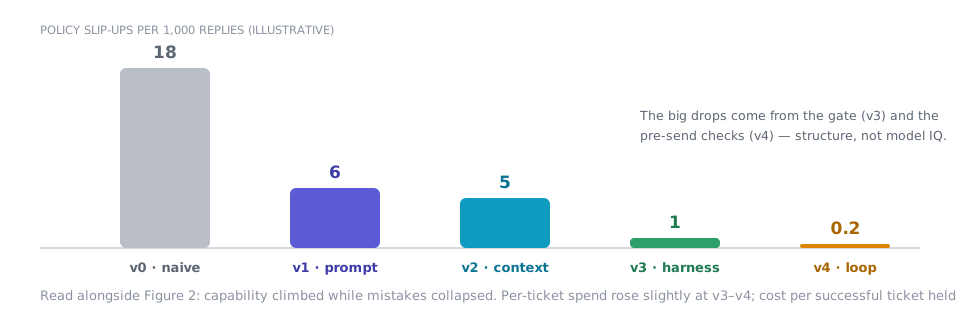
FIGURE 12 — The other line — mistakes collapsing. That trade is what "production-grade" means: paying a small, steady overhead to make failure rare, contained, and legible.
The whole guide in one box:
- What do I say? Write briefs that decide everything, especially the unhappy paths.
- What does it see? Treat the window as a budget: fetch just-in-time, summarize before you forget, write things down.
- What can it do? Build tools like products, errors like instructions, and permissions like a dial.
- How does it improve? Check inside every step, name every ending, and turn every failure into a test.
- And when something breaks — fix the layer that owns it.
Glossary
- Agent — A model given tools, memory, and a loop so it can pursue a goal across many steps, not just answer one question.
- Compaction — Replacing old conversation turns with a structured summary so the window stays dense without losing decisions.
- Context engineering — Curating everything the model sees in its window: what gets in, in what order, at what detail, removed how.
- Context rot — The quality decay that sets in as a window fills — attention spreads thinner across everything present.
- Context window — The model's short-term attention span: everything it can consider in a single request must fit here.
- Few-shot examples — Worked demonstrations inside a prompt that teach the task and its boundaries by precedent.
- Golden set — A fixed collection of real inputs with known-good answers, run like a test suite on every change.
- Groundedness — The share of an answer's factual claims that trace back to material actually provided to the model.
- Guardrail — A rule enforced outside the model's control — like a daily spending cap — that holds even when the model errs.
- Harness engineering — Designing the scaffold that turns a model into an agent: tools, sandbox, permissions, state, and traces.
- Headroom — Window space deliberately kept empty for the model's own thinking and answer.
- Human-in-the-loop — A designed point where a person approves, corrects, or takes over — typically at irreversible actions.
- Loop engineering — Designing how an agent iterates: verification, budgets, recovery, save-points, sign-offs, and the improvement flywheel.
- Lost-in-the-middle — Models attend best to the beginning and end of long input and skim the middle — position is part of the design.
- Model-graded rubric — Written scoring criteria applied by a separate grader model, calibrated against human judgment first.
- Output contract — The precisely specified shape of a response — sections, limits, allowed values — including what failure looks like.
- Prompt caching — Providers re-process an identical opening far more cheaply — a reason to keep the start of the window stable.
- Prompt engineering — Designing the instructions in a single request: role, task, rules, examples, and the shape of the answer.
- RAG (retrieval-augmented generation) — Fetching relevant documents into the window so the model answers from evidence, not memory.
- Re-ranking — Re-scoring a wide set of search results against the actual question, so only the best few are admitted.
- Retry key (idempotency) — A stable identifier on an action so a retry can never fire twice — one key, one refund, ever.
- Sandbox — A contained practice environment — allow-listed data and destinations, short-lived credentials — bounding what an action can touch.
- Scratchpad — The agent's working notes for the current task, kept outside the window and re-fetched when relevant.
- Stop condition — An explicit rule that ends a run in a named way: delivered, needs sign-off, out of budget, stuck, safety.
- Sub-agent — A helper agent with its own fresh window, dispatched for an oversized side-quest, returning a short brief.
- Trace — The complete recorded sequence of a run — every request, action, result, and timing. The logbook.
- Verifier — Whatever judges the work — rules, tests, or a graded rubric — independent of the model that produced it.
How is this guide?
Last updated on
Layer 4 · Loop Engineering
Running the quality loop — step verifiers, budget stop conditions, retry ladders, save-points, and the test flywheel.
AI as a Colleague, Not a Tool
Why treating AI as a colleague rather than a tool transforms organizational capability and creates lasting competitive advantage.