CI/CD & DevOps
DevSecOps Integrating security practices throughout the DevOps lifecycle
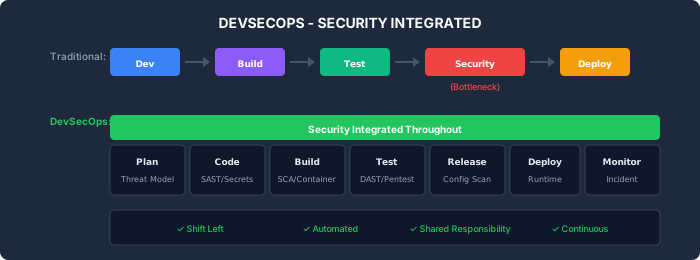
DevSecOps integrates security practices into every phase of the DevOps lifecycle. Rather than treating security as a gate at the end, DevSecOps makes security a shared responsibility across development, security, and operations teams.
Activity Description Tools Threat Modeling Identify security threats early STRIDE, OWASP Threat Dragon Security Requirements Define security acceptance criteria User stories, requirements Risk Assessment Evaluate and prioritize risks DREAD scoring
Activity Description Tools Secure Coding Follow secure coding standards ESLint security plugins Pre-commit Hooks Catch issues before commit Husky, pre-commit IDE Security Plugins Real-time security feedback Snyk IDE, SonarLint
Activity Description Tools SAST Static code analysis Semgrep, SonarQube, CodeQL SCA Dependency vulnerability scanning Snyk, npm audit, Trivy Secrets Detection Find exposed credentials Gitleaks, TruffleHog
Activity Description Tools DAST Dynamic application testing OWASP ZAP, Burp Suite IAST Interactive testing Contrast, Hdiv Penetration Testing Manual security testing Manual + automated
Activity Description Tools Container Scanning Image vulnerability scanning Trivy, Grype IaC Scanning Infrastructure code review Checkov, tfsec Configuration Audit Validate secure settings CIS Benchmarks
Activity Description Tools Runtime Protection Application security monitoring Falco, AWS GuardDuty SIEM Security event management Splunk, ELK Incident Response Security incident handling PagerDuty, runbooks
name : DevSecOps Pipeline on : [ push , pull_request ] jobs : # Pre-commit security checks secrets-scan : runs-on : ubuntu-latest steps : - uses : actions/checkout@v4 with : fetch-depth : 0 - uses : gitleaks/gitleaks-action@v2 env : GITHUB_TOKEN : ${{ secrets.GITHUB_TOKEN }} # Static analysis sast : runs-on : ubuntu-latest steps : - uses : actions/checkout@v4 - uses : returntocorp/semgrep-action@v1 with : config : >- p/security-audit p/secrets p/owasp-top-ten # Dependency scanning sca : runs-on : ubuntu-latest steps : - uses : actions/checkout@v4 - run : npm ci - run : npm audit --audit-level=high - uses : snyk/actions/node@master env : SNYK_TOKEN : ${{ secrets.SNYK_TOKEN }} # Build with security build : needs : [ secrets-scan , sast , sca ] runs-on : ubuntu-latest steps : - uses : actions/checkout@v4 - run : npm ci && npm run build - name : Build Docker image run : docker build -t myapp:${{ github.sha }} . # Container scanning container-scan : needs : build runs-on : ubuntu-latest steps : - uses : aquasecurity/trivy-action@master with : image-ref : myapp:${{ github.sha }} severity : 'HIGH,CRITICAL' exit-code : '1' # Infrastructure scanning iac-scan : runs-on : ubuntu-latest steps : - uses : actions/checkout@v4 - uses : bridgecrewio/checkov-action@v12 with : directory : infrastructure/ # Dynamic testing (staging) dast : needs : [ build , container-scan ] runs-on : ubuntu-latest environment : staging steps : - name : Deploy to staging run : ./deploy.sh staging - name : OWASP ZAP Scan uses : zaproxy/action-baseline@v0.7.0 with : target : 'https://staging.example.com' # Deploy to production deploy : needs : [ dast , iac-scan ] runs-on : ubuntu-latest environment : production steps : - name : Deploy to production run : ./deploy.sh production # sonar-project.properties sonar.qualitygate.wait=true sonar.qualitygate.timeout=300 # Quality gate conditions # - Coverage > 80% # - No new critical vulnerabilities # - No new security hotspots # - Duplicated lines < 3% security-gate : runs-on : ubuntu-latest needs : [ sast , sca , container-scan ] steps : - name : Check Security Gate run : | # Fail if any critical/high vulnerabilities if [ "$CRITICAL_VULNS" -gt 0 ] || [ "$HIGH_VULNS" -gt 5 ]; then echo "Security gate failed!" exit 1 fi # Fail if secrets detected if [ "$SECRETS_FOUND" == "true" ]; then echo "Secrets detected in code!" exit 1 fi echo "Security gate passed" # .semgrep.yml rules : # SQL Injection - id : sql-injection patterns : - pattern : $DB.query($QUERY + ...) message : Potential SQL injection severity : ERROR languages : [ javascript , typescript ] # Hardcoded secrets - id : hardcoded-password pattern-regex : password\s*=\s*['"][^'"]+['"] message : Hardcoded password detected severity : ERROR # Insecure crypto - id : weak-crypto patterns : - pattern : crypto.createHash('md5') - pattern : crypto.createHash('sha1') message : Weak cryptographic hash severity : WARNING # trivy.yaml severity : - CRITICAL - HIGH ignore-unfixed : true security-checks : - vuln - config - secret exit-code : 1 # .checkov.yaml framework : - terraform - kubernetes skip-check : - CKV_AWS_123 # Skip specific check with documented reason soft-fail : false compact : true # .gitleaks.toml title = "Gitleaks Configuration" [ extend ] useDefault = true [[ rules ]] id = "custom-api-key" description = "Custom API Key" regex = '''(?i)(api[_-]?key|apikey)\s*[:=]\s*['"]?([a-zA-Z0-9]{32,})['"]?''' secretGroup = 2 [ allowlist ] paths = [ ' '' test/.* '' ' , ' '' \.md$ '' ' , ] # Use GitHub secrets env : DATABASE_URL : ${{ secrets.DATABASE_URL }} API_KEY : ${{ secrets.API_KEY }} # Or fetch from secrets manager - name : Get secrets from AWS uses : aws-actions/aws-secretsmanager-get-secrets@v1 with : secret-ids : | prod/database prod/api-keys # Pod Security Policy apiVersion : policy/v1beta1 kind : PodSecurityPolicy metadata : name : restricted spec : privileged : false runAsUser : rule : MustRunAsNonRoot seLinux : rule : RunAsAny fsGroup : rule : RunAsAny volumes : - 'configMap' - 'emptyDir' - 'projected' - 'secret' - 'downwardAPI' - 'persistentVolumeClaim' readOnlyRootFilesystem : true allowPrivilegeEscalation : false apiVersion : networking.k8s.io/v1 kind : NetworkPolicy metadata : name : api-network-policy spec : podSelector : matchLabels : app : api policyTypes : - Ingress - Egress ingress : - from : - podSelector : matchLabels : app : web ports : - protocol : TCP port : 8080 egress : - to : - podSelector : matchLabels : app : database ports : - protocol : TCP port : 5432 Metric Description Target Mean Time to Remediate Time to fix vulnerabilities < 7 days (critical) Vulnerability Density Vulns per 1000 LOC < 1 Security Debt Open security issues Decreasing trend Scan Coverage % of code scanned 100% False Positive Rate Incorrect findings < 10%
┌─────────────────────────────────────────────────────────────────────────────┐ │ DEVSECOPS DASHBOARD │ ├─────────────────────────────────────────────────────────────────────────────┤ │ │ │ Open Vulnerabilities Security Gate Status │ │ ┌────┐ ┌────┐ ┌────┐ ┌───────────────────┐ │ │ │ 0 │ │ 5 │ │ 23 │ │ ✅ SAST Passed │ │ │ │Crit│ │High│ │Med │ │ ✅ SCA Passed │ │ │ └────┘ └────┘ └────┘ │ ✅ Secrets Clean │ │ │ │ ✅ Container OK │ │ │ MTTR (Critical): 2.1 days │ ✅ DAST Passed │ │ │ MTTR (High): 5.3 days └───────────────────┘ │ │ │ │ Vulnerability Trend (30 days) │ │ ┌────────────────────────────────────────────────────────────────┐ │ │ │ 50 ▄ │ │ │ │ 40 █▄ │ │ │ │ 30 ██▄▄▄ │ │ │ │ 20 █████▄▄▄▄▄▄▄▄▄▄ │ │ │ │ 10 ████████████████▄▄▄▄ │ │ │ └────────────────────────────────────────────────────────────────┘ │ │ │ └─────────────────────────────────────────────────────────────────────────────┘ DevSecOps generates compliance evidence automatically:
Evidence Type Source Purpose Scan Reports SAST/SCA/DAST Vulnerability management Pipeline Logs CI/CD Change audit trail Approval Records PR approvals Separation of duties Deployment History Deployment logs Release documentation
Framework DevSecOps Control HIPAA Vulnerability scanning, access controls PCI DSS Code review, penetration testing SOC 2 Change management, security testing FDA Validation evidence, traceability
Shift security left (earlier in pipeline)
Automate security testing
Make security everyone's responsibility
Fix vulnerabilities quickly
Track security metrics
Conduct regular threat modeling
Keep security tools updated
Treat security as a gate at the end
Ignore false positives (tune tools)
Skip security for speed
Store secrets in code
Deploy with critical vulnerabilities
Rely solely on automated tools
This section fulfills ISO 13485 requirements for risk management (7.1), design verification (7.3.6), and validation of processes (7.5.2), and ISO 27001 requirements for secure development lifecycle (A.8.25), security testing (A.8.29), vulnerability management (A.8.8), and secure coding (A.8.28).
View full compliance matrix
How is this guide?