
Integration Testing
Testing interactions between components, services, and external systems
Integration tests verify that different parts of your system work together correctly. They sit in the middle of the testing pyramid, providing confidence that components integrate properly without the overhead of full end-to-end tests.
What is Integration Testing?
Integration tests verify the interaction between:
- Multiple classes/modules within your application
- Your application and external services (databases, APIs)
- Different layers of your architecture (API → Service → Repository)
Integration vs Unit Tests
| Aspect | Unit Test | Integration Test |
|---|---|---|
| Scope | Single function/class | Multiple components |
| Dependencies | Mocked | Real or controlled |
| Speed | Very fast (ms) | Slower (seconds) |
| Database | Never | Often included |
| Network | Never | Sometimes included |
| Isolation | Complete | Partial |
Integration Testing Strategies
Big Bang Integration
Test all components together at once:
- Pros: Simple to set up
- Cons: Difficult to isolate failures
Incremental Integration
Test components progressively:
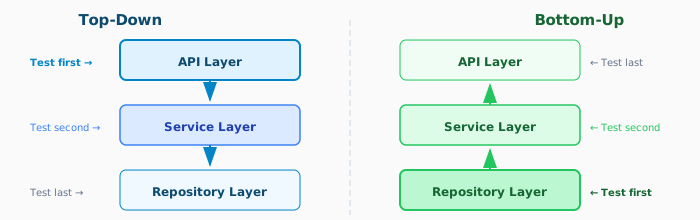
Top-Down: Start from high-level modules, stub lower levels
Bottom-Up: Start from low-level modules
Sandwich/Hybrid: Combine both approaches
API Integration Testing
Testing REST Endpoints
import request from 'supertest';
import { app } from '../src/app';
import { prisma } from '../src/db';

describe('POST /api/users', () => {
  beforeEach(async () => {
    await prisma.user.deleteMany();
  });

  afterAll(async () => {
    await prisma.$disconnect();
  });

  it('should create a new user', async () => {
    const userData = {
      name: 'John Doe',
      email: 'john@example.com',
      password: 'SecurePass123!',
    };

    const response = await request(app)
      .post('/api/users')
      .send(userData)
      .expect(201)
      .expect('Content-Type', /json/);

    expect(response.body).toMatchObject({
      id: expect.any(Number),
      name: 'John Doe',
      email: 'john@example.com',
    });
    expect(response.body).not.toHaveProperty('password');

    // Verify database state
    const dbUser = await prisma.user.findUnique({
      where: { email: 'john@example.com' },
    });
    expect(dbUser).toBeDefined();
    expect(dbUser?.name).toBe('John Doe');
  });

  it('should return 400 for invalid email', async () => {
    const response = await request(app)
      .post('/api/users')
      .send({ name: 'John', email: 'invalid', password: 'Pass123!' })
      .expect(400);

    expect(response.body.errors).toContainEqual(
      expect.objectContaining({ field: 'email' })
    );
  });

  it('should return 409 for duplicate email', async () => {
    await prisma.user.create({
      data: { name: 'Existing', email: 'john@example.com', passwordHash: 'xxx' },
    });

    await request(app)
      .post('/api/users')
      .send({ name: 'John', email: 'john@example.com', password: 'Pass123!' })
      .expect(409);
  });
});
Testing Authentication
describe('Authentication Integration', () => {
  let authToken: string;

  beforeAll(async () => {
    // Create test user
    await request(app)
      .post('/api/users')
      .send({ name: 'Test', email: 'test@example.com', password: 'Pass123!' });
  });

  it('should login with valid credentials', async () => {
    const response = await request(app)
      .post('/api/auth/login')
      .send({ email: 'test@example.com', password: 'Pass123!' })
      .expect(200);

    expect(response.body.token).toBeDefined();
    authToken = response.body.token;
  });

  it('should access protected route with token', async () => {
    await request(app)
      .get('/api/profile')
      .set('Authorization', `Bearer ${authToken}`)
      .expect(200);
  });

  it('should reject access without token', async () => {
    await request(app)
      .get('/api/profile')
      .expect(401);
  });
});
Database Integration Testing
Using Test Databases
// test-setup.ts
import { PrismaClient } from '@prisma/client';

const prisma = new PrismaClient({
  datasources: {
    db: { url: process.env.TEST_DATABASE_URL },
  },
});

beforeAll(async () => {
  // Run migrations on test database
  await prisma.$executeRaw`TRUNCATE TABLE users CASCADE`;
});

afterAll(async () => {
  await prisma.$disconnect();
});

export { prisma };
Transaction Rollback Pattern
Keep test database clean by rolling back transactions:
describe('OrderService', () => {
  let tx: PrismaClient;

  beforeEach(async () => {
    // Start transaction
    tx = await prisma.$transaction(async (prisma) => {
      return prisma;
    });
  });

  afterEach(async () => {
    // Rollback by throwing
    await tx.$disconnect();
  });

  it('should create order with items', async () => {
    const order = await orderService.createOrder(tx, {
      customerId: 1,
      items: [{ productId: 1, quantity: 2 }],
    });

    expect(order.items).toHaveLength(1);
    expect(order.total).toBeGreaterThan(0);
  });
});
Testing Repository Layer
describe('UserRepository', () => {
  const repository = new UserRepository(prisma);

  beforeEach(async () => {
    await prisma.user.deleteMany();
  });

  describe('findByEmail', () => {
    it('should find existing user', async () => {
      await prisma.user.create({
        data: {
          email: 'test@example.com',
          name: 'Test User',
          passwordHash: 'hashed',
        },
      });

      const user = await repository.findByEmail('test@example.com');

      expect(user).not.toBeNull();
      expect(user?.name).toBe('Test User');
    });

    it('should return null for non-existent user', async () => {
      const user = await repository.findByEmail('nonexistent@example.com');
      expect(user).toBeNull();
    });

    it('should be case-insensitive', async () => {
      await prisma.user.create({
        data: {
          email: 'Test@Example.com',
          name: 'Test',
          passwordHash: 'hashed',
        },
      });

      const user = await repository.findByEmail('test@example.com');
      expect(user).not.toBeNull();
    });
  });
});
External Service Integration
Mocking External APIs
Use tools like MSW (Mock Service Worker) for API mocking:
import { rest } from 'msw';
import { setupServer } from 'msw/node';

const server = setupServer(
  rest.get('https://api.stripe.com/v1/customers/:id', (req, res, ctx) => {
    return res(
      ctx.json({
        id: req.params.id,
        email: 'customer@example.com',
        name: 'Test Customer',
      })
    );
  }),

  rest.post('https://api.stripe.com/v1/charges', (req, res, ctx) => {
    return res(
      ctx.json({
        id: 'ch_test_123',
        status: 'succeeded',
        amount: 1000,
      })
    );
  })
);

beforeAll(() => server.listen());
afterEach(() => server.resetHandlers());
afterAll(() => server.close());

describe('PaymentService', () => {
  it('should process payment successfully', async () => {
    const result = await paymentService.charge({
      customerId: 'cus_123',
      amount: 1000,
    });

    expect(result.status).toBe('succeeded');
  });

  it('should handle payment failure', async () => {
    server.use(
      rest.post('https://api.stripe.com/v1/charges', (req, res, ctx) => {
        return res(
          ctx.status(402),
          ctx.json({ error: { message: 'Card declined' } })
        );
      })
    );

    await expect(paymentService.charge({
      customerId: 'cus_123',
      amount: 1000,
    })).rejects.toThrow('Card declined');
  });
});
Contract Testing
Verify your API matches expected contracts:
import { Pact } from '@pact-foundation/pact';

const provider = new Pact({
  consumer: 'OrderService',
  provider: 'InventoryService',
});

describe('Inventory API Contract', () => {
  beforeAll(() => provider.setup());
  afterAll(() => provider.finalize());
  afterEach(() => provider.verify());

  it('should check product availability', async () => {
    await provider.addInteraction({
      state: 'product 123 has 10 items in stock',
      uponReceiving: 'a request for product availability',
      withRequest: {
        method: 'GET',
        path: '/api/inventory/123',
      },
      willRespondWith: {
        status: 200,
        body: {
          productId: '123',
          available: 10,
          reserved: 2,
        },
      },
    });

    const inventory = await inventoryClient.checkAvailability('123');
    expect(inventory.available).toBe(10);
  });
});
Message Queue Integration
Testing with RabbitMQ/Kafka
describe('OrderProcessor', () => {
  let connection: amqp.Connection;
  let channel: amqp.Channel;

  beforeAll(async () => {
    connection = await amqp.connect(process.env.TEST_RABBITMQ_URL);
    channel = await connection.createChannel();
    await channel.assertQueue('test-orders');
  });

  afterAll(async () => {
    await channel.deleteQueue('test-orders');
    await connection.close();
  });

  it('should process order message', async () => {
    const order = { id: '123', items: [{ productId: '1', quantity: 2 }] };

    // Send message
    channel.sendToQueue('test-orders', Buffer.from(JSON.stringify(order)));

    // Wait for processing
    await new Promise(resolve => setTimeout(resolve, 1000));

    // Verify side effects
    const processedOrder = await prisma.order.findUnique({
      where: { id: '123' },
    });
    expect(processedOrder?.status).toBe('processed');
  });
});
Integration Testing Best Practices
Test Environment Management
// docker-compose.test.yml
version: '3.8'
services:
  test-db:
    image: postgres:15
    environment:
      POSTGRES_DB: test
      POSTGRES_USER: test
      POSTGRES_PASSWORD: test
    ports:
      - "5433:5432"

  test-redis:
    image: redis:7
    ports:
      - "6380:6379"
# Start test infrastructure
docker-compose -f docker-compose.test.yml up -d
# Run integration tests
npm run test:integration
# Cleanup
docker-compose -f docker-compose.test.yml down -vTest Data Management
// factories/userFactory.ts
export const createTestUser = async (overrides = {}) => {
  return prisma.user.create({
    data: {
      name: 'Test User',
      email: `test-${Date.now()}@example.com`,
      passwordHash: await hash('password123'),
      ...overrides,
    },
  });
};

// Usage in tests
const user = await createTestUser({ role: 'admin' });
Parallel Test Execution
// jest.config.js
module.exports = {
  maxWorkers: 4,
  // Each worker gets its own database schema
  globalSetup: './test/setup.js',
  globalTeardown: './test/teardown.js',
};

// setup.js
module.exports = async () => {
  const workerId = process.env.JEST_WORKER_ID;
  process.env.TEST_DATABASE_URL = `postgres://test:test@localhost:5433/test_${workerId}`;
};
Integration Testing Checklist
Before Writing Tests
- Test environment configured
- Test database available
- External services mocked or available
- Test data factories created
For Each Test
- Clean state before test
- Realistic test data
- Verify both success and failure paths
- Check side effects (DB, events, etc.)
- Cleanup after test
CI/CD Considerations
- Tests run in isolated environment
- Test infrastructure provisioned automatically
- Reasonable timeout settings
- Parallel execution configured
- Test reports generated
Related Resources
Compliance
This section fulfills ISO 13485 requirements for design verification (7.3.6) and process validation (7.5.6), and ISO 27001 requirements for secure development lifecycle (A.8.25) and secure architecture verification (A.8.27).
How is this guide?
Last updated on