
Vulnerability Scanning
Automated security testing tools and practices for finding vulnerabilities
Vulnerability scanning is the automated process of identifying security weaknesses in your code, dependencies, infrastructure, and running applications. Regular scanning is essential for proactive security management.
Types of Security Scanning
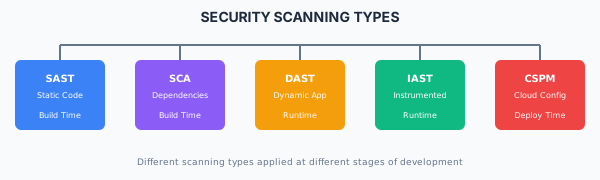
| Type | Full Name | What It Scans | When |
|---|---|---|---|
| SAST | Static Application Security Testing | Source code | Build time |
| SCA | Software Composition Analysis | Dependencies | Build time |
| DAST | Dynamic Application Security Testing | Running application | Runtime |
| IAST | Interactive Application Security Testing | Instrumented app | Runtime |
| CSPM | Cloud Security Posture Management | Cloud configuration | Deploy/Runtime |
Static Application Security Testing (SAST)
What SAST Detects
- SQL/NoSQL injection vulnerabilities
- Cross-site scripting (XSS) patterns
- Insecure cryptographic usage
- Hardcoded secrets
- Path traversal vulnerabilities
- Unsafe deserialization
- Command injection
SAST Tools
| Tool | Languages | Integration |
|---|---|---|
| Semgrep | 20+ languages | CLI, CI/CD, IDE |
| SonarQube | 25+ languages | CI/CD, IDE plugins |
| CodeQL | 10+ languages | GitHub native |
| Snyk Code | 10+ languages | CI/CD, IDE |
| Checkmarx | 25+ languages | Enterprise CI/CD |
Semgrep Configuration
# .semgrep.yml
rules:
  - id: sql-injection
    patterns:
      - pattern: |
          $DB.query($QUERY + ...)
      - pattern: |
          $DB.execute(f"...")
    message: Potential SQL injection vulnerability
    languages: [python, javascript, typescript]
    severity: ERROR

  - id: hardcoded-secret
    pattern-regex: '(api[_-]?key|secret|password)\s*=\s*["\'][^"\']{8,}["\']'
    message: Potential hardcoded secret
    languages: [generic]
    severity: WARNING
CI/CD Integration
# GitHub Actions SAST
name: SAST Scan
on: [push, pull_request]

jobs:
  semgrep:
    runs-on: ubuntu-latest
    steps:
      - uses: actions/checkout@v4
      - uses: returntocorp/semgrep-action@v1
        with:
          config: >-
            p/security-audit
            p/secrets
            p/owasp-top-ten

  codeql:
    runs-on: ubuntu-latest
    steps:
      - uses: actions/checkout@v4
      - uses: github/codeql-action/init@v2
        with:
          languages: javascript, typescript
      - uses: github/codeql-action/analyze@v2
Software Composition Analysis (SCA)
What SCA Detects
- Known vulnerabilities (CVEs) in dependencies
- Outdated packages
- License compliance issues
- Malicious packages
SCA Tools
| Tool | Package Managers | Features |
|---|---|---|
| npm audit | npm | Built-in, free |
| Snyk | npm, pip, maven, etc. | Remediation advice, monitoring |
| Dependabot | Most languages | GitHub native, auto-PRs |
| OWASP Dependency-Check | Java, .NET, npm | Open source, offline |
| Trivy | npm, pip, gems, etc. | Container & code scanning |
npm Audit Usage
# Check for vulnerabilities
npm audit

# Check with severity threshold
npm audit --audit-level=high

# Generate JSON report
npm audit --json > audit-report.json

# Automatically fix (when possible)
npm audit fix

# Force fix (may break compatibility)
npm audit fix --force
Snyk CLI Usage
# Test for vulnerabilities
snyk test

# Monitor project (continuous scanning)
snyk monitor

# Test container image
snyk container test my-image:latest

# Test infrastructure as code
snyk iac test ./terraform/
Trivy Scanning
# Scan filesystem
trivy fs --severity HIGH,CRITICAL .

# Scan container image
trivy image --severity HIGH,CRITICAL my-app:latest

# Scan with SBOM output
trivy fs --format spdx-json -o sbom.json .
CI/CD SCA Integration
# GitHub Actions SCA
name: Dependency Scan
on: [push, pull_request]

jobs:
  npm-audit:
    runs-on: ubuntu-latest
    steps:
      - uses: actions/checkout@v4
      - run: npm ci
      - run: npm audit --audit-level=high

  snyk:
    runs-on: ubuntu-latest
    steps:
      - uses: actions/checkout@v4
      - uses: snyk/actions/node@master
        env:
          SNYK_TOKEN: ${{ secrets.SNYK_TOKEN }}
        with:
          args: --severity-threshold=high

  trivy:
    runs-on: ubuntu-latest
    steps:
      - uses: actions/checkout@v4
      - uses: aquasecurity/trivy-action@master
        with:
          scan-type: 'fs'
          severity: 'HIGH,CRITICAL'
          exit-code: '1'
Dynamic Application Security Testing (DAST)
What DAST Detects
- Runtime injection vulnerabilities
- Authentication/authorization flaws
- Security misconfigurations
- Sensitive data exposure
- Cross-site scripting (reflected/stored)
DAST Tools
| Tool | Type | Use Case |
|---|---|---|
| OWASP ZAP | Open source | General web app scanning |
| Burp Suite | Commercial | Manual + automated testing |
| Nuclei | Open source | Template-based scanning |
| Nikto | Open source | Web server scanning |
OWASP ZAP Automation
# Baseline scan (passive)
docker run -t owasp/zap2docker-stable zap-baseline.py \
  -t https://your-app.com \
  -r report.html

# Full scan (active)
docker run -t owasp/zap2docker-stable zap-full-scan.py \
  -t https://your-app.com \
  -r report.html

# API scan
docker run -t owasp/zap2docker-stable zap-api-scan.py \
  -t https://your-app.com/openapi.json \
  -f openapi \
  -r report.html
Nuclei Scanning
# Run all templates
nuclei -u https://your-app.com

# Run specific severity
nuclei -u https://your-app.com -severity critical,high

# Run specific templates
nuclei -u https://your-app.com -t cves/ -t vulnerabilities/

# Output to JSON
nuclei -u https://your-app.com -json -o results.json
CI/CD DAST Integration
# GitHub Actions DAST
name: DAST Scan
on:
  push:
    branches: [main]

jobs:
  zap-scan:
    runs-on: ubuntu-latest
    steps:
      - name: Deploy to staging
        run: ./deploy-staging.sh

      - name: OWASP ZAP Scan
        uses: zaproxy/action-baseline@v0.7.0
        with:
          target: 'https://staging.your-app.com'
          rules_file_name: '.zap/rules.tsv'

      - name: Upload Report
        uses: actions/upload-artifact@v3
        with:
          name: zap-report
          path: report_html.html
Container Security Scanning
Image Scanning
# Trivy container scan
trivy image --severity HIGH,CRITICAL myapp:latest

# Grype container scan
grype myapp:latest

# Docker Scout (Docker native)
docker scout cves myapp:latest
CI/CD Container Scanning
# GitHub Actions container scanning
name: Container Security
on: [push]

jobs:
  scan:
    runs-on: ubuntu-latest
    steps:
      - uses: actions/checkout@v4

      - name: Build image
        run: docker build -t myapp:${{ github.sha }} .

      - name: Scan with Trivy
        uses: aquasecurity/trivy-action@master
        with:
          image-ref: 'myapp:${{ github.sha }}'
          severity: 'HIGH,CRITICAL'
          exit-code: '1'
          format: 'sarif'
          output: 'trivy-results.sarif'

      - name: Upload to GitHub Security
        uses: github/codeql-action/upload-sarif@v2
        with:
          sarif_file: 'trivy-results.sarif'
Infrastructure Scanning
Infrastructure as Code (IaC) Scanning
| Tool | IaC Types | Features |
|---|---|---|
| Checkov | Terraform, CloudFormation, K8s | 1000+ policies |
| tfsec | Terraform | Terraform-specific |
| Terrascan | Terraform, K8s, Helm | OPA policy support |
| Snyk IaC | Terraform, CloudFormation, K8s | Remediation advice |
Checkov Usage
# Scan Terraform directory
checkov -d ./terraform/

# Scan with specific check
checkov -d ./terraform/ --check CKV_AWS_18

# Output to JSON
checkov -d ./terraform/ -o json > results.json

# Skip specific checks
checkov -d ./terraform/ --skip-check CKV_AWS_123
tfsec Usage
# Basic scan
tfsec ./terraform/

# Scan with severity threshold
tfsec ./terraform/ --minimum-severity HIGH

# Output to SARIF
tfsec ./terraform/ --format sarif > results.sarif
Vulnerability Management
Severity Classification
| Severity | CVSS Score | Response Time | Action |
|---|---|---|---|
| Critical | 9.0-10.0 | 24-48 hours | Immediate fix required |
| High | 7.0-8.9 | 7 days | Prioritize in current sprint |
| Medium | 4.0-6.9 | 30 days | Schedule for remediation |
| Low | 0.1-3.9 | 90 days | Address in maintenance |
Vulnerability Tracking
# vulnerability-tracking.yml
vulnerabilities:
  - id: CVE-2024-12345
    severity: high
    package: lodash
    affected_version: "<4.17.21"
    fixed_version: "4.17.21"
    status: remediated
    remediation_date: 2024-01-15
    ticket: JIRA-1234

  - id: SNYK-JS-EXPRESS-1234567
    severity: medium
    package: express
    affected_version: "<4.18.0"
    fixed_version: "4.18.0"
    status: accepted_risk
    justification: "Not exposed to untrusted input"
    review_date: 2024-06-15
    ticket: JIRA-1235
Risk Acceptance Process
For vulnerabilities that cannot be immediately fixed:
- Document the vulnerability - CVE, severity, affected component
- Assess the risk - Exploitability in your context
- Define compensating controls - Mitigations in place
- Set review date - When to reassess
- Obtain approval - Security team sign-off
- Track in registry - Maintain accepted risk registry
Scanning Schedule
| Scan Type | Frequency | Trigger |
|---|---|---|
| SAST | Every commit | CI/CD pipeline |
| SCA (deps) | Every build | CI/CD pipeline |
| Container scan | Every image build | CI/CD pipeline |
| DAST (baseline) | Weekly | Scheduled job |
| DAST (full) | Pre-release | Release pipeline |
| IaC scan | Every change | CI/CD pipeline |
| Penetration test | Quarterly/Annually | Manual schedule |
Reporting and Metrics
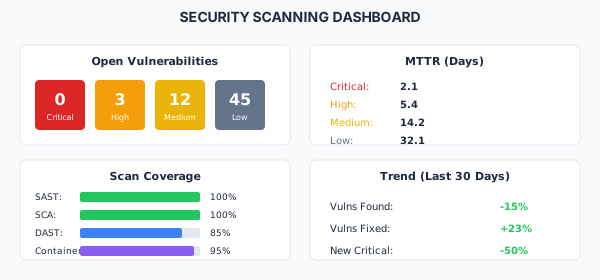
Key Metrics
| Metric | Description | Target |
|---|---|---|
| Mean Time to Remediate (MTTR) | Average time to fix vulnerabilities | < 7 days (critical) |
| Vulnerability Density | Vulns per 1000 lines of code | < 1 |
| Open Critical Vulns | Count of unresolved critical issues | 0 |
| Scan Coverage | % of code/components scanned | 100% |
| False Positive Rate | % of findings that aren't real | < 10% |
Dashboard Example
Best Practices
Do
- Scan on every commit and build
- Block deployments on critical findings
- Track all vulnerabilities centrally
- Set severity-based SLAs for remediation
- Include scanning in developer workflows
- Review and tune rules to reduce false positives
- Generate SBOMs for compliance
Don't
- Ignore scan results until audit time
- Accept risk without documentation
- Rely on a single scanning tool
- Skip scanning for "minor" changes
- Allow critical vulnerabilities to production
- Set unrealistic remediation timelines
Related Resources
Compliance
This section fulfills ISO 13485 requirements for design verification (7.3.6) and improvement (8.5.1), and ISO 27001 requirements for vulnerability management (A.8.8), security testing (A.8.29), and technical compliance review (A.5.36).
How is this guide?
Last updated on