
Distributed Tracing
Tracing requests across services to understand system behavior and debug issues
Distributed tracing tracks requests as they flow through your system, showing how services interact and where time is spent. It's essential for debugging microservices and understanding complex system behavior.
Tracing Concepts
Trace Structure
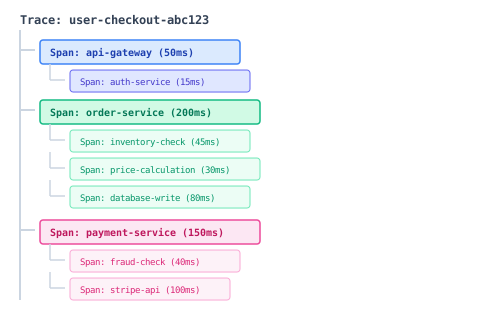
Key Terms
| Term | Definition |
|---|---|
| Trace | Complete journey of a request through the system |
| Span | Single unit of work (function call, HTTP request, DB query) |
| Trace ID | Unique identifier for the entire trace |
| Span ID | Unique identifier for a specific span |
| Parent Span ID | Links span to its parent in the trace tree |
| Tags/Attributes | Key-value metadata attached to spans |
| Events/Logs | Timestamped annotations within a span |
OpenTelemetry Implementation
Setup (Node.js)
// tracing.ts
import { NodeSDK } from '@opentelemetry/sdk-node';
import { getNodeAutoInstrumentations } from '@opentelemetry/auto-instrumentations-node';
import { OTLPTraceExporter } from '@opentelemetry/exporter-trace-otlp-http';
import { Resource } from '@opentelemetry/resources';
import { SemanticResourceAttributes } from '@opentelemetry/semantic-conventions';

const sdk = new NodeSDK({
  resource: new Resource({
    [SemanticResourceAttributes.SERVICE_NAME]: 'order-service',
    [SemanticResourceAttributes.SERVICE_VERSION]: '1.0.0',
    [SemanticResourceAttributes.DEPLOYMENT_ENVIRONMENT]: process.env.NODE_ENV,
  }),
  traceExporter: new OTLPTraceExporter({
    url: process.env.OTEL_EXPORTER_OTLP_ENDPOINT || 'http://localhost:4318/v1/traces',
  }),
  instrumentations: [
    getNodeAutoInstrumentations({
      '@opentelemetry/instrumentation-http': {
        ignoreIncomingPaths: ['/health', '/metrics'],
      },
      '@opentelemetry/instrumentation-fs': {
        enabled: false,
      },
    }),
  ],
});

sdk.start();

// Graceful shutdown
process.on('SIGTERM', () => {
  sdk.shutdown()
    .then(() => console.log('Tracing terminated'))
    .catch((error) => console.error('Error terminating tracing', error))
    .finally(() => process.exit(0));
});
Manual Instrumentation
import { trace, SpanStatusCode, context } from '@opentelemetry/api';

const tracer = trace.getTracer('order-service');

async function processOrder(order: Order) {
  // Create a span for the operation
  return tracer.startActiveSpan('processOrder', async (span) => {
    try {
      // Add attributes
      span.setAttribute('order.id', order.id);
      span.setAttribute('order.items.count', order.items.length);
      span.setAttribute('customer.id', order.customerId);

      // Record event
      span.addEvent('Starting order processing');

      // Nested operation with child span
      const inventory = await tracer.startActiveSpan('checkInventory', async (childSpan) => {
        try {
          const result = await inventoryService.check(order.items);
          childSpan.setAttribute('inventory.available', result.available);
          return result;
        } finally {
          childSpan.end();
        }
      });

      if (!inventory.available) {
        span.addEvent('Inventory check failed', { reason: 'out_of_stock' });
        span.setStatus({ code: SpanStatusCode.ERROR, message: 'Out of stock' });
        throw new Error('Items out of stock');
      }

      // Continue with payment
      const payment = await tracer.startActiveSpan('processPayment', async (paymentSpan) => {
        paymentSpan.setAttribute('payment.method', order.paymentMethod);
        try {
          return await paymentService.charge(order);
        } finally {
          paymentSpan.end();
        }
      });

      span.addEvent('Order processed successfully');
      span.setStatus({ code: SpanStatusCode.OK });

      return { orderId: order.id, paymentId: payment.id };

    } catch (error) {
      span.recordException(error);
      span.setStatus({ code: SpanStatusCode.ERROR, message: error.message });
      throw error;
    } finally {
      span.end();
    }
  });
}
Context Propagation
HTTP Headers
Trace context is propagated via HTTP headers:
traceparent: 00-0af7651916cd43dd8448eb211c80319c-b7ad6b7169203331-01
tracestate: congo=t61rcWkgMzE
Propagating Across Services
import { propagation, context } from '@opentelemetry/api';

// Extract context from incoming request
app.use((req, res, next) => {
  const parentContext = propagation.extract(context.active(), req.headers);

  context.with(parentContext, () => {
    next();
  });
});

// Inject context into outgoing request
async function callExternalService(data: any) {
  const headers: Record<string, string> = {};
  propagation.inject(context.active(), headers);

  return fetch('https://external-service.com/api', {
    method: 'POST',
    headers: {
      'Content-Type': 'application/json',
      ...headers,  // Includes traceparent header
    },
    body: JSON.stringify(data),
  });
}
Tracing Best Practices
What to Trace
| Trace | Reason |
|---|---|
| HTTP requests | Entry points and cross-service calls |
| Database queries | Often the bottleneck |
| Cache operations | Hit/miss ratios |
| External API calls | Third-party latency |
| Message queue operations | Async processing |
| Significant business operations | Order processing, user actions |
Span Attributes
Use semantic conventions for consistency:
// HTTP
span.setAttribute('http.method', 'GET');
span.setAttribute('http.url', 'https://api.example.com/users');
span.setAttribute('http.status_code', 200);

// Database
span.setAttribute('db.system', 'postgresql');
span.setAttribute('db.name', 'orders');
span.setAttribute('db.operation', 'SELECT');
span.setAttribute('db.statement', 'SELECT * FROM orders WHERE id = ?');

// User/Business
span.setAttribute('enduser.id', 'user-123');
span.setAttribute('order.id', 'order-456');
span.setAttribute('payment.amount', 99.99);
Sampling
For high-traffic systems, sample traces to reduce volume:
import { TraceIdRatioBasedSampler } from '@opentelemetry/sdk-trace-base';

const sampler = new TraceIdRatioBasedSampler(0.1); // 10% of traces

// Or custom sampling
class CustomSampler {
  shouldSample(context, traceId, spanName, spanKind, attributes) {
    // Always sample errors
    if (attributes['error']) {
      return { decision: SamplingDecision.RECORD_AND_SAMPLED };
    }

    // Always sample slow requests
    if (attributes['http.target']?.includes('/checkout')) {
      return { decision: SamplingDecision.RECORD_AND_SAMPLED };
    }

    // Otherwise, 10% sample
    return Math.random() < 0.1
      ? { decision: SamplingDecision.RECORD_AND_SAMPLED }
      : { decision: SamplingDecision.NOT_RECORD };
  }
}
Tracing Backends
Jaeger
Open-source, end-to-end distributed tracing:
# docker-compose.yml
services:
  jaeger:
    image: jaegertracing/all-in-one:latest
    ports:
      - "16686:16686"  # UI
      - "4317:4317"    # OTLP gRPC
      - "4318:4318"    # OTLP HTTP
    environment:
      - COLLECTOR_OTLP_ENABLED=true
Grafana Tempo
Scalable, cost-effective trace storage:
# tempo-config.yaml
server:
  http_listen_port: 3200

distributor:
  receivers:
    otlp:
      protocols:
        grpc:
        http:

storage:
  trace:
    backend: local
    local:
      path: /tmp/tempo/blocks
Correlating Traces with Logs
Adding Trace IDs to Logs
import { trace, context } from '@opentelemetry/api';
import winston from 'winston';

const logger = winston.createLogger({
  format: winston.format.combine(
    winston.format((info) => {
      const span = trace.getSpan(context.active());
      if (span) {
        const spanContext = span.spanContext();
        info.traceId = spanContext.traceId;
        info.spanId = spanContext.spanId;
      }
      return info;
    })(),
    winston.format.json()
  ),
  transports: [new winston.transports.Console()],
});

// Log output includes trace context
// {"level":"info","message":"Processing order","traceId":"abc123","spanId":"def456"}
Querying by Trace ID
In Grafana, link from traces to logs:
# Loki query from trace
{app="order-service"} | json | traceId="abc123def456..."
Debugging with Traces
Finding Slow Requests
1. Filter traces by duration > 1s
2. Open trace waterfall view
3. Identify longest span
4. Check span attributes for context
5. Look at child spans for breakdown
Finding Errors
1. Filter traces by status = ERROR
2. Find the span with the error
3. Check exception details
4. Follow the trace to the root cause
5. Check related logs via trace ID
Common Patterns
The Waterfall Pattern (sequential calls):
[Service A: 500ms]
  └─[Service B: 300ms]
└─[Database: 200ms]Optimization: Can any calls be parallelized?
The Fan-Out Pattern (parallel calls):
[API Gateway: 600ms]
  ├─[Service A: 400ms]
  ├─[Service B: 300ms]
  └─[Service C: 600ms]
Total time determined by slowest parallel call
Best Practices
Do
- Use OpenTelemetry for vendor-neutral instrumentation
- Add meaningful span names and attributes
- Propagate context across service boundaries
- Sample appropriately in production
- Correlate traces with logs and metrics
- Set up trace-based alerting for errors
Don't
- Create spans for trivial operations
- Log sensitive data in span attributes
- Ignore sampling (leads to cost overrun)
- Forget to end spans (memory leaks)
- Use synchronous exporters (blocks requests)
Related Resources
Compliance
This section fulfills ISO 13485 requirements for traceability (7.5.3) and corrective action (8.5.2), and ISO 27001 requirements for monitoring activities (A.8.16) and evidence collection (A.5.28).
How is this guide?
Last updated on