
CI/CD & DevOps
Continuous Delivery
Practices for reliably releasing software to production at any time
Continuous Delivery (CD) extends Continuous Integration by ensuring that code is always in a deployable state. It automates the release process so that deployments can be performed on-demand with confidence.
Continuous Delivery vs Continuous Deployment
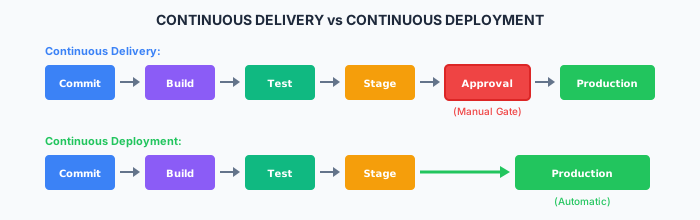
| Aspect | Continuous Delivery | Continuous Deployment |
|---|---|---|
| Production Deploy | Manual approval | Automatic |
| Risk | Lower (human gate) | Higher (automated) |
| Speed | Slower | Faster |
| Compliance | Easier to audit | Requires automation trust |
| Best For | Regulated environments | Fast-moving products |
Deployment Pipeline
Pipeline Architecture
# Complete CD pipeline
name: Deploy
on:
  push:
    branches: [main]

jobs:
  build:
    runs-on: ubuntu-latest
    outputs:
      version: ${{ steps.version.outputs.version }}
    steps:
      - uses: actions/checkout@v4
      - id: version
        run: echo "version=$(date +%Y%m%d)-${{ github.sha }}" >> $GITHUB_OUTPUT
      - run: npm ci && npm run build
      - uses: actions/upload-artifact@v4
        with:
          name: build-${{ steps.version.outputs.version }}
          path: dist/

  test:
    needs: build
    runs-on: ubuntu-latest
    steps:
      - uses: actions/checkout@v4
      - run: npm ci && npm test

  deploy-staging:
    needs: [build, test]
    runs-on: ubuntu-latest
    environment: staging
    steps:
      - uses: actions/download-artifact@v4
        with:
          name: build-${{ needs.build.outputs.version }}
      - run: ./deploy.sh staging

  e2e-test:
    needs: deploy-staging
    runs-on: ubuntu-latest
    steps:
      - uses: actions/checkout@v4
      - run: npm run test:e2e -- --base-url=$STAGING_URL

  deploy-production:
    needs: [deploy-staging, e2e-test]
    runs-on: ubuntu-latest
    environment: production
    steps:
      - uses: actions/download-artifact@v4
        with:
          name: build-${{ needs.build.outputs.version }}
      - run: ./deploy.sh production
Deployment Strategies
Blue-Green Deployment
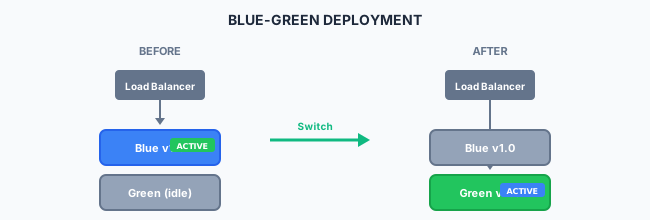
Benefits:
- Zero-downtime deployment
- Instant rollback capability
- Full environment testing before switch
Implementation:
# Kubernetes blue-green
apiVersion: v1
kind: Service
metadata:
  name: myapp
spec:
  selector:
    app: myapp
    version: blue  # Switch to 'green' for cutover
  ports:
    - port: 80
Canary Deployment

Implementation:
# Istio canary with traffic splitting
apiVersion: networking.istio.io/v1beta1
kind: VirtualService
metadata:
  name: myapp
spec:
  hosts:
    - myapp
  http:
    - route:
        - destination:
            host: myapp
            subset: stable
          weight: 95
        - destination:
            host: myapp
            subset: canary
          weight: 5
Rolling Deployment
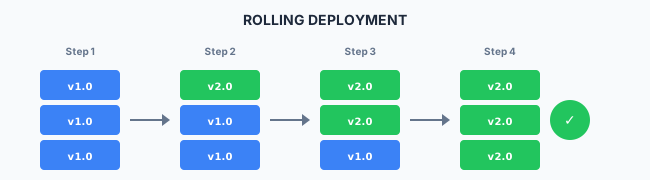
Kubernetes rolling update:
apiVersion: apps/v1
kind: Deployment
spec:
  replicas: 3
  strategy:
    type: RollingUpdate
    rollingUpdate:
      maxSurge: 1        # Extra pods during update
      maxUnavailable: 0  # Always maintain capacity
Environment Management
Environment Configuration
# environments/production.yaml
database:
  host: prod-db.example.com
  pool_size: 20

cache:
  host: prod-redis.example.com
  ttl: 3600

features:
  new_dashboard: true
  beta_api: false

monitoring:
  log_level: info
  sample_rate: 0.1
Environment Promotion
# Promote same artifact through environments
deploy:
  stage: deploy
  script:
    - docker pull $CI_REGISTRY_IMAGE:$CI_COMMIT_SHA
    - docker tag $CI_REGISTRY_IMAGE:$CI_COMMIT_SHA $CI_REGISTRY_IMAGE:$ENVIRONMENT
    - kubectl set image deployment/myapp myapp=$CI_REGISTRY_IMAGE:$CI_COMMIT_SHA
  rules:
    - if: $CI_COMMIT_BRANCH == "main"
      variables:
        ENVIRONMENT: staging
    - if: $CI_COMMIT_TAG
      variables:
        ENVIRONMENT: production
      when: manual
Release Management
Semantic Versioning
MAJOR.MINOR.PATCH

1.0.0  → Initial release
1.0.1  → Patch (bug fix)
1.1.0  → Minor (new feature, backward compatible)
2.0.0  → Major (breaking change)
Release Notes Generation
# Generate changelog from commits
- name: Generate Release Notes
  uses: release-drafter/release-drafter@v5
  with:
    config-name: release-drafter.yml
  env:
    GITHUB_TOKEN: ${{ secrets.GITHUB_TOKEN }}
Git Tags for Releases
# Create release tag
git tag -a v1.2.0 -m "Release version 1.2.0"
git push origin v1.2.0

# Trigger production deploy on tag
on:
  push:
    tags:
      - 'v*'
Rollback Strategies
Immediate Rollback
# Kubernetes rollback
kubectl rollout undo deployment/myapp

# Or rollback to specific revision
kubectl rollout undo deployment/myapp --to-revision=2
Database Rollback Considerations
┌─────────────────────────────────────────────────────────────────────────────┐
│                     DATABASE MIGRATION STRATEGY                              │
└─────────────────────────────────────────────────────────────────────────────┘

Forward-Only Migrations (Recommended):
1. Deploy backward-compatible schema change
2. Deploy application code
3. Clean up old schema (if needed)

Example: Adding a column
Step 1: Add column (nullable)        ← Schema v2
Step 2: Deploy code using new column ← App v2
Step 3: Backfill data
Step 4: Add NOT NULL constraint      ← Schema v3
Feature Flags for Safe Rollback
// Using feature flags for safe rollout
const features = {
  newCheckoutFlow: {
    enabled: process.env.FEATURE_NEW_CHECKOUT === 'true',
    percentage: 10, // Gradual rollout
  },
};

function checkout(cart) {
  if (isFeatureEnabled('newCheckoutFlow', user)) {
    return newCheckoutFlow(cart);
  }
  return legacyCheckoutFlow(cart);
}
Deployment Automation
Automated Deployment Script
#!/bin/bash
# deploy.sh

set -e

ENVIRONMENT=$1
VERSION=${2:-latest}

echo "Deploying version $VERSION to $ENVIRONMENT"

# Validate environment
if [[ ! "$ENVIRONMENT" =~ ^(staging|production)$ ]]; then
  echo "Invalid environment: $ENVIRONMENT"
  exit 1
fi

# Pre-deployment checks
echo "Running pre-deployment checks..."
./scripts/health-check.sh $ENVIRONMENT

# Deploy
echo "Deploying..."
kubectl config use-context $ENVIRONMENT
kubectl set image deployment/myapp myapp=myapp:$VERSION

# Wait for rollout
echo "Waiting for rollout..."
kubectl rollout status deployment/myapp --timeout=5m

# Post-deployment verification
echo "Running smoke tests..."
./scripts/smoke-test.sh $ENVIRONMENT

echo "Deployment complete!"
GitOps with ArgoCD
# argocd/application.yaml
apiVersion: argoproj.io/v1alpha1
kind: Application
metadata:
  name: myapp
  namespace: argocd
spec:
  project: default
  source:
    repoURL: https://github.com/org/myapp-config
    targetRevision: HEAD
    path: environments/production
  destination:
    server: https://kubernetes.default.svc
    namespace: myapp
  syncPolicy:
    automated:
      prune: true
      selfHeal: true
Compliance & Audit
Deployment Audit Trail
# Log all deployments
- name: Record Deployment
  run: |
    curl -X POST $AUDIT_API/deployments \
      -H "Authorization: Bearer $AUDIT_TOKEN" \
      -d '{
        "application": "${{ github.repository }}",
        "version": "${{ github.sha }}",
        "environment": "production",
        "deployer": "${{ github.actor }}",
        "timestamp": "'$(date -u +%Y-%m-%dT%H:%M:%SZ)'",
        "pipeline_url": "${{ github.server_url }}/${{ github.repository }}/actions/runs/${{ github.run_id }}"
      }'
Approval Gates
deploy-production:
  environment:
    name: production
    url: https://myapp.example.com
  needs: [deploy-staging, e2e-tests]
  # Requires manual approval configured in GitHub settings
  steps:
    - name: Deploy
      run: ./deploy.sh production
Change Records
For regulated environments, maintain:
- Deployment request and approval
- What changed (version, config)
- Who approved and deployed
- When deployment occurred
- Verification results
- Rollback history
Best Practices
Do
- Deploy the same artifact to all environments
- Automate everything (including rollbacks)
- Test in staging before production
- Monitor deployments in real-time
- Keep deployments small and frequent
- Maintain deployment runbooks
Don't
- Build different artifacts per environment
- Deploy on Fridays (unless you're confident)
- Skip staging for "small" changes
- Ignore deployment metrics
- Deploy without rollback capability
- Make manual changes to production
Related Resources
- CI/CD Overview
- Continuous Integration
- Infrastructure as Code
- DevSecOps
- Microsoft Playbook: Continuous Delivery
Compliance
This section fulfills ISO 13485 requirements for production control (7.5.1), validation of processes (7.5.2), and traceability (7.5.3), and ISO 27001 requirements for change management (A.8.32), secure development lifecycle (A.8.25), and operational procedures (A.5.37).
How is this guide?
Last updated on