
Checklists
508 Accessibility Checklist
Section 508 and WCAG compliance requirements for accessible software
Section 508 of the Rehabilitation Act requires federal agencies to make electronic and information technology accessible to people with disabilities. These standards align with WCAG (Web Content Accessibility Guidelines) and apply to software, websites, and electronic content.
Accessibility Overview
| Standard | Description | Applicability |
|---|---|---|
| Section 508 | Federal accessibility requirements | Federal agencies, contractors |
| WCAG 2.1 AA | Web accessibility guidelines | All web content |
| ADA | Americans with Disabilities Act | Public accommodations |
Software Applications (§1194.21)
Keyboard Accessibility
- All functions are executable from a keyboard
- Keyboard focus is visible and moves logically
- No keyboard traps (user can navigate away from any element)
- Keyboard shortcuts don't conflict with assistive technology
Screen Reader Compatibility
- All UI elements have accessible names
- Images have text alternatives (alt text)
- Form fields have associated labels
- Error messages are announced to screen readers
- Dynamic content updates are announced
Visual Design
- Color is not the only means of conveying information
- Text has sufficient contrast ratio (4.5:1 minimum)
- UI respects user contrast/color settings
- No flashing content (2-55 Hz range)
- Content is readable at 200% zoom
Forms and Input
- Form fields have visible labels
- Required fields are clearly indicated
- Error messages are clear and specific
- Sufficient time for timed responses
- Instructions are provided before complex forms
Web Applications
Content Structure
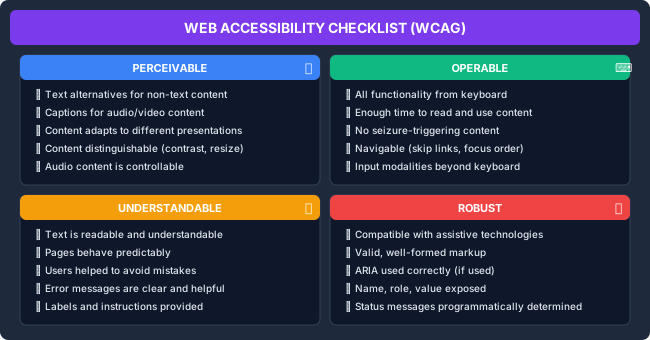
Images and Media
| Requirement | Implementation |
|---|---|
| Images | Provide alt text describing the image purpose |
| Decorative images | Use empty alt="" or CSS background |
| Complex images | Provide long description |
| Video | Provide captions and audio description |
| Audio | Provide transcript |
HTML Implementation
<!-- Proper heading structure -->
<h1>Page Title</h1>
  <h2>Section</h2>
    <h3>Subsection</h3>
  <h2>Another Section</h2>

<!-- Accessible form -->
<form>
  <label for="email">Email Address *</label>
  <input type="email" id="email" name="email" required
         aria-describedby="email-hint">
  <span id="email-hint">We'll never share your email</span>
</form>

<!-- Accessible link -->
<a href="/reports">Download quarterly report (PDF, 2MB)</a>

<!-- Skip navigation -->
<a href="#main-content" class="skip-link">Skip to main content</a>

<!-- Data table -->
<table>
  <caption>Quarterly Sales Report</caption>
  <thead>
    <tr>
      <th scope="col">Region</th>
      <th scope="col">Q1</th>
      <th scope="col">Q2</th>
    </tr>
  </thead>
  <tbody>
    <tr>
      <th scope="row">North</th>
      <td>$1.2M</td>
      <td>$1.4M</td>
    </tr>
  </tbody>
</table>
ARIA Guidelines
When to Use ARIA
| Situation | Approach |
|---|---|
| Native HTML exists | Use native HTML (button, not div with role="button") |
| Custom widget | Add appropriate ARIA roles and properties |
| Dynamic content | Use aria-live regions |
| State changes | Update aria-* attributes |
Common ARIA Patterns
<!-- Modal dialog -->
<div role="dialog" aria-modal="true" aria-labelledby="dialog-title">
  <h2 id="dialog-title">Confirm Action</h2>
  <p>Are you sure you want to proceed?</p>
  <button>Cancel</button>
  <button>Confirm</button>
</div>

<!-- Tabs -->
<div role="tablist" aria-label="Settings tabs">
  <button role="tab" aria-selected="true" aria-controls="panel-1">General</button>
  <button role="tab" aria-selected="false" aria-controls="panel-2">Security</button>
</div>
<div role="tabpanel" id="panel-1">General settings content</div>
<div role="tabpanel" id="panel-2" hidden>Security settings content</div>

<!-- Live region for updates -->
<div aria-live="polite" aria-atomic="true">
  <!-- Status messages appear here -->
</div>
Functional Performance Criteria (§1194.31)
Vision
- At least one mode works without vision (screen reader support)
- Support for users with low vision (zoom, contrast)
Hearing
- At least one mode works without hearing (visual indicators)
- Support for hearing aids (no interference)
Motor
- Works without fine motor control
- No simultaneous key presses required
- Operable with limited reach/strength
Speech
- At least one mode doesn't require speech
Testing Checklist
Automated Testing
- Run accessibility linter (axe, WAVE)
- Validate HTML structure
- Check color contrast programmatically
- Test with accessibility CI tools
Manual Testing
- Navigate using only keyboard
- Test with screen reader (NVDA, VoiceOver, JAWS)
- Test at 200% browser zoom
- Test with high contrast mode
- Verify logical tab order
Tools
| Tool | Purpose |
|---|---|
| axe DevTools | Automated accessibility testing |
| WAVE | Visual accessibility evaluation |
| Lighthouse | Accessibility audit in Chrome |
| NVDA | Free Windows screen reader |
| VoiceOver | Built-in macOS/iOS screen reader |
| Color Contrast Analyzer | Check contrast ratios |
Common Issues and Fixes
Missing Alternative Text
<!-- Bad -->
<img src="logo.png">

<!-- Good -->
<img src="logo.png" alt="Company Name">

<!-- Decorative -->
<img src="decoration.png" alt="">
Poor Focus Indication
/* Bad - removes focus indicator */
:focus { outline: none; }

/* Good - enhanced focus */
:focus {
  outline: 2px solid #0066cc;
  outline-offset: 2px;
}
Insufficient Contrast
/* Bad - 2.5:1 ratio */
.text { color: #888888; background: #ffffff; }

/* Good - 7:1 ratio */
.text { color: #333333; background: #ffffff; }
Missing Form Labels
<!-- Bad -->
<input type="text" placeholder="Enter name">

<!-- Good -->
<label for="name">Name</label>
<input type="text" id="name" placeholder="John Doe">
Documentation Requirements (§1194.41)
- Product documentation available in accessible formats
- Accessibility features documented
- Support services accommodate users with disabilities
Related Resources
- Compliance Checklists
- Security Checklists
- Design Guidelines
- WCAG 2.1 Guidelines
- Section 508 Standards
Compliance
This section fulfills ISO 13485 requirements for design outputs (7.3.4) and customer requirements (7.2.1), and ISO 27001 requirements for regulatory requirements (A.5.31) and compliance verification (A.5.36).
How is this guide?
Last updated on