
Git Workflow
Version control best practices and branching strategies
Effective version control practices are essential for team collaboration, code quality, and release management. This guide covers branching strategies, commit standards, and automation with Git hooks.
Branching Strategies
GitFlow
GitFlow is a structured branching model suitable for projects with scheduled releases.
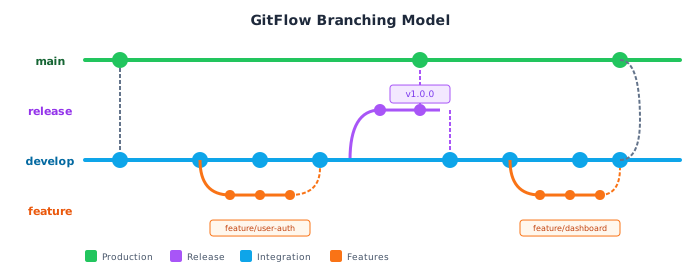
| Branch | Purpose | Merges To |
|---|---|---|
main | Production-ready code | - |
develop | Integration branch | main via release |
feature/* | New features | develop |
release/* | Release preparation | main and develop |
hotfix/* | Production fixes | main and develop |
Trunk-Based Development
Trunk-based development uses short-lived feature branches and frequent integration.
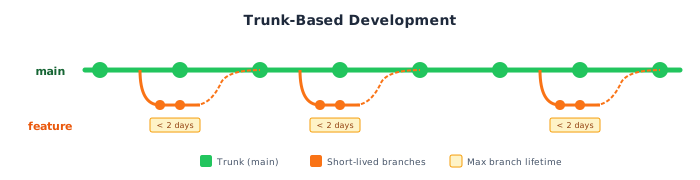
| Characteristic | GitFlow | Trunk-Based |
|---|---|---|
| Branch lifetime | Days to weeks | Hours to days |
| Integration frequency | Periodic | Continuous |
| Release process | Release branches | Feature flags |
| Best for | Scheduled releases | Continuous deployment |
GitHub Flow
A simplified workflow for continuous deployment.
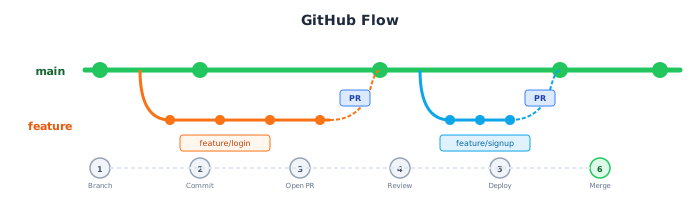
- Create branch from
main - Make changes and commit
- Open pull request
- Review and discuss
- Deploy and test (optionally)
- Merge to
main
Branch Naming Conventions
Standard Prefixes
| Prefix | Purpose | Example |
|---|---|---|
feature/ | New functionality | feature/user-authentication |
bugfix/ | Bug fixes | bugfix/login-validation |
hotfix/ | Urgent production fixes | hotfix/security-patch |
release/ | Release preparation | release/v1.2.0 |
chore/ | Maintenance tasks | chore/update-dependencies |
docs/ | Documentation updates | docs/api-reference |
refactor/ | Code refactoring | refactor/auth-module |
Naming Guidelines
# Good: descriptive, kebab-case
feature/add-user-registration
bugfix/fix-password-reset-email
hotfix/patch-sql-injection

# Bad: vague, inconsistent
feature/stuff
fix1
john-branch
Commit Message Standards
Conventional Commits
The Conventional Commits specification provides a structured format.
<type>[optional scope]: <description>

[optional body]

[optional footer(s)]
Commit Types
| Type | Description | Example |
|---|---|---|
feat | New feature | feat: add user registration |
fix | Bug fix | fix: correct password validation |
docs | Documentation | docs: update API reference |
style | Formatting (no code change) | style: fix indentation |
refactor | Code refactoring | refactor: extract auth service |
test | Adding tests | test: add login unit tests |
chore | Maintenance | chore: update dependencies |
perf | Performance improvement | perf: optimize database queries |
ci | CI/CD changes | ci: add deployment workflow |
Examples
# Feature with scope
feat(auth): add password reset functionality

Implement password reset flow with email verification.
- Add password reset request endpoint
- Add email template for reset link
- Add token validation and password update

Closes #123

# Breaking change
feat(api)!: change response format for user endpoint

BREAKING CHANGE: The user endpoint now returns a nested
data object instead of flat properties.

# Bug fix
fix(validation): handle empty email in registration form

Previously, submitting an empty email would cause a 500 error.
Now returns a proper validation message.

Fixes #456
Pre-commit Hooks
Husky Setup
# Install Husky
npm install --save-dev husky

# Initialize Husky
npx husky init

# Add pre-commit hook
echo "npx lint-staged" > .husky/pre-commit
lint-staged Configuration
{
  "lint-staged": {
    "*.{js,ts,jsx,tsx}": [
      "eslint --fix",
      "prettier --write"
    ],
    "*.{json,md,yml,yaml}": [
      "prettier --write"
    ],
    "*.py": [
      "black",
      "ruff check --fix"
    ]
  }
}
Commit Message Validation
# Install commitlint
npm install --save-dev @commitlint/cli @commitlint/config-conventional

# Create commitlint.config.js
echo "module.exports = { extends: ['@commitlint/config-conventional'] };" > commitlint.config.js

# Add commit-msg hook
echo "npx --no -- commitlint --edit \$1" > .husky/commit-msg
Pull Request Guidelines
PR Title Format
Follow the same format as commit messages:
feat(auth): add social login support
fix(api): handle rate limiting correctly
docs: update installation instructions
PR Description Template
## Summary
Brief description of changes.

## Changes
- Added X
- Modified Y
- Removed Z

## Testing
- [ ] Unit tests added/updated
- [ ] Integration tests pass
- [ ] Manual testing performed

## Screenshots (if applicable)
[Add screenshots for UI changes]

## Related Issues
Closes #123
Review Checklist
- Code follows style guidelines
- Tests cover new functionality
- Documentation is updated
- No security vulnerabilities introduced
- Breaking changes are documented
- Commit messages follow conventions
Git Best Practices
Do
- Write meaningful commit messages
- Keep commits atomic (one logical change)
- Pull/rebase frequently from main
- Use feature flags for incomplete features
- Squash WIP commits before merging
- Delete merged branches
Don't
- Commit directly to main
- Force push to shared branches
- Include sensitive data in commits
- Create overly large pull requests
- Leave merge conflicts unresolved
- Commit generated or build files
Common Git Commands
Branch Management
# Create and switch to new branch
git checkout -b feature/new-feature

# Switch branches
git checkout main

# Delete local branch
git branch -d feature/old-feature

# Delete remote branch
git push origin --delete feature/old-feature

# List all branches
git branch -a
Updating Your Branch
# Fetch and rebase (preferred for feature branches)
git fetch origin
git rebase origin/main

# Fetch and merge
git fetch origin
git merge origin/main

# Pull with rebase
git pull --rebase origin main
Undoing Changes
# Undo last commit (keep changes staged)
git reset --soft HEAD~1

# Undo last commit (keep changes unstaged)
git reset HEAD~1

# Discard all local changes
git reset --hard HEAD

# Revert a specific commit (creates new commit)
git revert <commit-hash>
Related Resources
- Pull Request Process
- Code Reviews
- Conventional Commits
- Git Best Practices
- Atlassian Git Tutorials
- GitHub Flow Guide
Compliance
This section fulfills ISO 13485 requirements for document control (4.2.3), change control (7.3.9), and identification and traceability (7.5.3), and ISO 27001 requirements for change management (A.8.32), secure development lifecycle (A.8.25), and configuration management (A.8.9).
How is this guide?
Last updated on