
Logging
Structured logging practices for debugging, auditing, and compliance
Logging is the foundation of observability, providing a record of discrete events in your system. Well-structured logs enable debugging, auditing, and compliance verification.
Logging Fundamentals
What to Log
| Category | Examples | Level |
|---|---|---|
| Errors | Exceptions, failures, crashes | ERROR |
| Warnings | Degraded performance, retries | WARN |
| Business Events | User actions, transactions | INFO |
| Operations | Deployments, config changes | INFO |
| Debug Info | Request details, state changes | DEBUG |
Log Levels
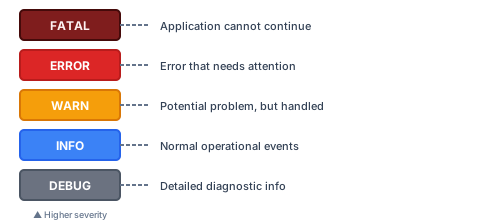
Production Recommendation: INFO level by default, DEBUG for troubleshooting
Structured Logging
Why Structured?
Unstructured (Bad):
2024-01-15 10:32:15 User john@example.com logged in from 192.168.1.1Structured (Good):
{
  "timestamp": "2024-01-15T10:32:15.123Z",
  "level": "info",
  "message": "User login successful",
  "userId": "user-123",
  "email": "john@example.com",
  "ipAddress": "192.168.1.1",
  "userAgent": "Mozilla/5.0...",
  "traceId": "abc-123-def"
}
Benefits
| Aspect | Structured | Unstructured |
|---|---|---|
| Searching | Easy field queries | Regex patterns |
| Parsing | Automatic | Manual |
| Analytics | Aggregations possible | Difficult |
| Alerting | Field-based rules | Text matching |
| Storage | Optimized | Verbose |
Implementation Examples
Node.js with Winston
import winston from 'winston';

const logger = winston.createLogger({
  level: process.env.LOG_LEVEL || 'info',
  format: winston.format.combine(
    winston.format.timestamp(),
    winston.format.errors({ stack: true }),
    winston.format.json()
  ),
  defaultMeta: {
    service: process.env.SERVICE_NAME || 'my-service',
    version: process.env.APP_VERSION || '1.0.0',
    environment: process.env.NODE_ENV || 'development',
  },
  transports: [
    new winston.transports.Console(),
    // Add file transport for production
    ...(process.env.NODE_ENV === 'production'
      ? [new winston.transports.File({ filename: 'app.log' })]
      : []),
  ],
});

// Usage
logger.info('User login successful', {
  userId: 'user-123',
  email: 'john@example.com',
  ipAddress: req.ip,
});

logger.error('Database connection failed', {
  error: error.message,
  stack: error.stack,
  database: 'primary',
});
Python with structlog
import structlog

structlog.configure(
    processors=[
        structlog.stdlib.add_log_level,
        structlog.stdlib.add_logger_name,
        structlog.processors.TimeStamper(fmt="iso"),
        structlog.processors.StackInfoRenderer(),
        structlog.processors.format_exc_info,
        structlog.processors.JSONRenderer()
    ],
    wrapper_class=structlog.stdlib.BoundLogger,
    context_class=dict,
    logger_factory=structlog.stdlib.LoggerFactory(),
)

logger = structlog.get_logger()

# Usage
logger.info(
    "user_login_successful",
    user_id="user-123",
    email="john@example.com",
    ip_address=request.remote_addr
)

logger.error(
    "database_connection_failed",
    error=str(e),
    database="primary"
)
Context Propagation
Request Context
Add context that follows the request through your system:
// Middleware to add request context
app.use((req, res, next) => {
  const requestId = req.headers['x-request-id'] || uuid();
  const requestLogger = logger.child({
    requestId,
    method: req.method,
    path: req.path,
    userId: req.user?.id,
  });

  req.log = requestLogger;
  res.setHeader('X-Request-Id', requestId);
  next();
});

// Use in handlers
app.get('/users/:id', async (req, res) => {
  req.log.info('Fetching user', { targetUserId: req.params.id });

  try {
    const user = await userService.getById(req.params.id);
    req.log.info('User fetched successfully');
    res.json(user);
  } catch (error) {
    req.log.error('Failed to fetch user', { error: error.message });
    res.status(500).json({ error: 'Internal error' });
  }
});
Async Local Storage (Node.js)
import { AsyncLocalStorage } from 'async_hooks';

interface LogContext {
  requestId: string;
  userId?: string;
  traceId?: string;
}

const asyncLocalStorage = new AsyncLocalStorage<LogContext>();

function getContext(): LogContext {
  return asyncLocalStorage.getStore() || { requestId: 'unknown' };
}

// Enhanced logger
const logger = {
  info: (message: string, data?: object) => {
    console.log(JSON.stringify({
      timestamp: new Date().toISOString(),
      level: 'info',
      message,
      ...getContext(),
      ...data,
    }));
  },
  // ... other levels
};

// Middleware
app.use((req, res, next) => {
  const context: LogContext = {
    requestId: req.headers['x-request-id'] || uuid(),
    userId: req.user?.id,
    traceId: req.headers['x-trace-id'],
  };

  asyncLocalStorage.run(context, () => next());
});
Audit Logging
Compliance-Required Events
For regulated systems, log these events with specific fields:
interface AuditLogEntry {
  timestamp: string;
  eventType: 'CREATE' | 'READ' | 'UPDATE' | 'DELETE' | 'LOGIN' | 'LOGOUT';
  userId: string;
  userEmail: string;
  userRole: string;
  resourceType: string;
  resourceId: string;
  action: string;
  outcome: 'SUCCESS' | 'FAILURE';
  ipAddress: string;
  userAgent: string;
  details?: Record<string, unknown>;
}

class AuditLogger {
  log(entry: Omit<AuditLogEntry, 'timestamp'>) {
    const auditEntry: AuditLogEntry = {
      timestamp: new Date().toISOString(),
      ...entry,
    };

    // Log to audit-specific destination
    auditLogger.info('AUDIT', auditEntry);

    // Also send to audit database for long-term retention
    auditRepository.create(auditEntry);
  }
}

// Usage
auditLogger.log({
  eventType: 'READ',
  userId: user.id,
  userEmail: user.email,
  userRole: user.role,
  resourceType: 'PatientRecord',
  resourceId: patientId,
  action: 'VIEW_PATIENT_RECORD',
  outcome: 'SUCCESS',
  ipAddress: req.ip,
  userAgent: req.headers['user-agent'],
  details: { fieldsAccessed: ['name', 'dob', 'diagnosis'] },
});
Audit Log Immutability
// Ensure audit logs cannot be modified
class ImmutableAuditLogger {
  private readonly writeStream: WriteStream;
  private hashChain: string = '';

  async log(entry: AuditLogEntry) {
    // Create hash chain for tamper detection
    const previousHash = this.hashChain;
    const entryWithHash = {
      ...entry,
      previousHash,
      hash: await this.computeHash(entry, previousHash),
    };

    this.hashChain = entryWithHash.hash;

    // Append-only write
    this.writeStream.write(JSON.stringify(entryWithHash) + '\n');

    // Also write to immutable storage (S3 with Object Lock, etc.)
    await this.sendToImmutableStorage(entryWithHash);
  }

  private async computeHash(entry: AuditLogEntry, previousHash: string): Promise<string> {
    const data = JSON.stringify({ ...entry, previousHash });
    return crypto.createHash('sha256').update(data).digest('hex');
  }
}
Sensitive Data Handling
What NOT to Log
// NEVER log these directly
const sensitiveFields = [
  'password',
  'token',
  'apiKey',
  'ssn',
  'creditCard',
  'cvv',
  'phi',  // Protected Health Information
];

// Sanitization middleware
function sanitizeLogData(data: object): object {
  const sanitized = { ...data };

  for (const key of Object.keys(sanitized)) {
    if (sensitiveFields.some(f => key.toLowerCase().includes(f))) {
      sanitized[key] = '[REDACTED]';
    } else if (typeof sanitized[key] === 'object') {
      sanitized[key] = sanitizeLogData(sanitized[key]);
    }
  }

  return sanitized;
}
Masking Techniques
function maskEmail(email: string): string {
  const [local, domain] = email.split('@');
  return `${local[0]}***@${domain}`;
}

function maskCreditCard(number: string): string {
  return `****-****-****-${number.slice(-4)}`;
}

function maskSSN(ssn: string): string {
  return `***-**-${ssn.slice(-4)}`;
}

// Usage in logs
logger.info('Payment processed', {
  userId: user.id,
  cardNumber: maskCreditCard(card.number),  // ****-****-****-1234
  amount: payment.amount,
});
Log Aggregation
Sending to Centralized System
// Using Winston with multiple transports
import { createLogger, transports, format } from 'winston';
import { ElasticsearchTransport } from 'winston-elasticsearch';

const logger = createLogger({
  transports: [
    // Console for local development
    new transports.Console(),

    // Elasticsearch for production
    new ElasticsearchTransport({
      level: 'info',
      clientOpts: { node: process.env.ELASTICSEARCH_URL },
      indexPrefix: 'app-logs',
    }),

    // File for backup
    new transports.File({
      filename: '/var/log/app/app.log',
      maxsize: 100 * 1024 * 1024, // 100MB
      maxFiles: 10,
    }),
  ],
});
Fluentd/Fluent Bit Sidecar
# kubernetes deployment with logging sidecar
apiVersion: apps/v1
kind: Deployment
spec:
  template:
    spec:
      containers:
        - name: app
          image: my-app:latest
          volumeMounts:
            - name: logs
              mountPath: /var/log/app

        - name: fluent-bit
          image: fluent/fluent-bit:latest
          volumeMounts:
            - name: logs
              mountPath: /var/log/app
            - name: fluent-config
              mountPath: /fluent-bit/etc/

      volumes:
        - name: logs
          emptyDir: {}
        - name: fluent-config
          configMap:
            name: fluent-bit-config
Log Querying Examples
Elasticsearch/OpenSearch
// Find all errors in the last hour
GET /app-logs-*/_search
{
  "query": {
    "bool": {
      "must": [
        { "term": { "level": "error" } },
        { "range": { "timestamp": { "gte": "now-1h" } } }
      ]
    }
  }
}

// Find all actions by specific user
GET /app-logs-*/_search
{
  "query": {
    "term": { "userId": "user-123" }
  },
  "sort": [{ "timestamp": "desc" }]
}
Loki (LogQL)
# Errors in the last hour
{app="my-service"} |= "error" | json | level="error"

# Slow requests (> 1000ms)
{app="my-service"} | json | duration_ms > 1000

# User activity
{app="my-service"} | json | userId="user-123"
Best Practices
Do
- Use structured JSON format
- Include correlation IDs (requestId, traceId)
- Log at appropriate levels
- Include relevant context
- Sanitize sensitive data
- Configure log rotation
Don't
- Log passwords or secrets
- Log full request/response bodies with PII
- Use inconsistent formats
- Log at DEBUG level in production
- Ignore log volume costs
- Skip error stack traces
Related Resources
Compliance
This section fulfills ISO 13485 requirements for control of records (4.2.4) and monitoring and measurement (8.2.4), and ISO 27001 requirements for event logging (A.8.15), monitoring activities (A.8.16), and protection of log information (A.8.15).
How is this guide?
Last updated on