
Secrets Management
Best practices for managing API keys, passwords, tokens, and other sensitive credentials
Secrets management is the practice of securely storing, accessing, and auditing sensitive credentials like API keys, passwords, certificates, and encryption keys. Poor secrets management is a leading cause of security breaches.
What are Secrets?
| Secret Type | Examples | Risk if Exposed |
|---|---|---|
| API Keys | AWS access keys, Stripe keys | Unauthorized API access, billing fraud |
| Passwords | Database passwords, admin credentials | Data breach, system compromise |
| Tokens | OAuth tokens, JWTs, session tokens | Account takeover, impersonation |
| Certificates | TLS/SSL certs, signing keys | Man-in-the-middle, code signing abuse |
| Encryption Keys | AES keys, KMS keys | Data decryption, privacy breach |
| Connection Strings | Database URLs with credentials | Database access |
The Golden Rule
Never store secrets in source code, configuration files, or anywhere that gets committed to version control.
❌ BAD: Secrets in Code
─────────────────────────────────────────────────────────────
const API_KEY = "sk_live_abc123xyz";  // NEVER DO THIS
const DB_PASSWORD = "MyP@ssw0rd123";  // NEVER DO THIS

✅ GOOD: Secrets from Environment
─────────────────────────────────────────────────────────────
const API_KEY = process.env.API_KEY;
const DB_PASSWORD = process.env.DB_PASSWORD;
Secrets Management Architecture
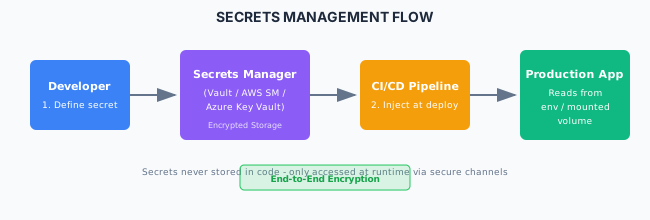
Secrets Storage Solutions
Cloud Secrets Managers
| Service | Provider | Features |
|---|---|---|
| AWS Secrets Manager | AWS | Rotation, cross-account, RDS integration |
| Azure Key Vault | Azure | HSM support, RBAC, managed identity |
| Google Secret Manager | GCP | Versioning, IAM, automatic replication |
| HashiCorp Vault | Self-hosted/Cloud | Dynamic secrets, PKI, multi-cloud |
AWS Secrets Manager Example
import { SecretsManagerClient, GetSecretValueCommand } from '@aws-sdk/client-secrets-manager';

const client = new SecretsManagerClient({ region: 'us-east-1' });

async function getSecret(secretName: string): Promise<string> {
  const command = new GetSecretValueCommand({ SecretId: secretName });
  const response = await client.send(command);

  if (response.SecretString) {
    return response.SecretString;
  }

  throw new Error('Secret not found');
}

// Usage
const dbPassword = await getSecret('prod/database/password');
HashiCorp Vault Example
import Vault from 'node-vault';

const vault = Vault({
  apiVersion: 'v1',
  endpoint: process.env.VAULT_ADDR,
  token: process.env.VAULT_TOKEN,
});

async function getSecret(path: string): Promise<object> {
  const result = await vault.read(path);
  return result.data.data;
}

// Usage
const secrets = await getSecret('secret/data/myapp/database');
const { username, password } = secrets;
Environment-Based Secrets
Local Development
# .env.local (never commit this file)
DATABASE_URL=postgresql://user:pass@localhost:5432/mydb
API_KEY=sk_test_development_key
JWT_SECRET=local-development-secret
// Load environment variables
import 'dotenv/config';
// Access secrets
const dbUrl = process.env.DATABASE_URL;
const apiKey = process.env.API_KEY;.gitignore Configuration
# Environment files
.env
.env.local
.env.*.local
.env.production

# Secret files
*.pem
*.key
secrets/
credentials.json

# IDE secrets
.idea/secrets/
.vscode/settings.json
CI/CD Secrets Integration
GitHub Actions
# .github/workflows/deploy.yml
name: Deploy
on: [push]

jobs:
  deploy:
    runs-on: ubuntu-latest
    steps:
      - uses: actions/checkout@v4

      - name: Deploy with secrets
        env:
          DATABASE_URL: ${{ secrets.DATABASE_URL }}
          API_KEY: ${{ secrets.API_KEY }}
        run: |
          npm run deploy

      # Or use OIDC for cloud provider auth (recommended)
      - name: Configure AWS Credentials
        uses: aws-actions/configure-aws-credentials@v4
        with:
          role-to-assume: arn:aws:iam::123456789:role/deploy-role
          aws-region: us-east-1
GitLab CI
# .gitlab-ci.yml
deploy:
  stage: deploy
  variables:
    DATABASE_URL: $DATABASE_URL  # From GitLab CI/CD variables
  script:
    - npm run deploy
  environment:
    name: production
Azure DevOps
# azure-pipelines.yml
stages:
  - stage: Deploy
    jobs:
      - job: DeployJob
        steps:
          - task: AzureKeyVault@2
            inputs:
              azureSubscription: 'MyAzureConnection'
              KeyVaultName: 'my-keyvault'
              SecretsFilter: '*'
              RunAsPreJob: true

          - script: npm run deploy
            env:
              DATABASE_URL: $(database-url)
Kubernetes Secrets
Creating Secrets
# kubernetes/secrets.yaml
apiVersion: v1
kind: Secret
metadata:
  name: app-secrets
type: Opaque
stringData:
  DATABASE_URL: postgresql://user:pass@db:5432/mydb
  API_KEY: sk_live_abc123
# Create from command line
kubectl create secret generic app-secrets \
--from-literal=DATABASE_URL='postgresql://user:pass@db:5432/mydb' \
--from-literal=API_KEY='sk_live_abc123'
# Create from file
kubectl create secret generic tls-certs \
--from-file=tls.crt=./cert.pem \
--from-file=tls.key=./key.pemUsing Secrets in Pods
# kubernetes/deployment.yaml
apiVersion: apps/v1
kind: Deployment
metadata:
  name: myapp
spec:
  template:
    spec:
      containers:
        - name: app
          image: myapp:latest

          # As environment variables
          envFrom:
            - secretRef:
                name: app-secrets

          # Or individual variables
          env:
            - name: DATABASE_URL
              valueFrom:
                secretKeyRef:
                  name: app-secrets
                  key: DATABASE_URL

          # As mounted files
          volumeMounts:
            - name: secrets-volume
              mountPath: /etc/secrets
              readOnly: true

      volumes:
        - name: secrets-volume
          secret:
            secretName: app-secrets
External Secrets Operator
# Sync secrets from AWS Secrets Manager to Kubernetes
apiVersion: external-secrets.io/v1beta1
kind: ExternalSecret
metadata:
  name: app-secrets
spec:
  refreshInterval: 1h
  secretStoreRef:
    kind: SecretStore
    name: aws-secrets-manager
  target:
    name: app-secrets
    creationPolicy: Owner
  data:
    - secretKey: DATABASE_URL
      remoteRef:
        key: prod/database
        property: url
Secret Rotation
Why Rotate Secrets?
- Limits exposure window if compromised
- Compliance requirements (PCI DSS, HIPAA)
- Personnel changes
- Suspected breach response
Rotation Strategies
| Strategy | Description | Use Case |
|---|---|---|
| Manual | Human-initiated rotation | Low-frequency, high-impact secrets |
| Scheduled | Automatic on time interval | Database passwords, API keys |
| On-demand | Triggered by event | Suspected compromise |
| Dynamic | Short-lived, generated per-use | Database connections |
AWS Secrets Manager Rotation
import {
  SecretsManagerClient,
  RotateSecretCommand
} from '@aws-sdk/client-secrets-manager';

// Lambda function for rotation
export async function handler(event: {
  SecretId: string;
  ClientRequestToken: string;
  Step: string;
}) {
  const { SecretId, ClientRequestToken, Step } = event;

  switch (Step) {
    case 'createSecret':
      // Generate new secret version
      await createNewSecret(SecretId, ClientRequestToken);
      break;
    case 'setSecret':
      // Update the service with new credential
      await updateServiceCredential(SecretId, ClientRequestToken);
      break;
    case 'testSecret':
      // Verify new credential works
      await testNewCredential(SecretId, ClientRequestToken);
      break;
    case 'finishSecret':
      // Mark new version as current
      await finalizeRotation(SecretId, ClientRequestToken);
      break;
  }
}
Application Support for Rotation
// Design apps to handle credential refresh
class DatabaseConnection {
  private pool: Pool;
  private lastRefresh: Date;

  async getConnection() {
    // Check if credentials might have rotated
    if (this.shouldRefreshCredentials()) {
      await this.refreshCredentials();
    }

    try {
      return await this.pool.connect();
    } catch (error) {
      // On auth failure, try refreshing credentials
      if (isAuthError(error)) {
        await this.refreshCredentials();
        return await this.pool.connect();
      }
      throw error;
    }
  }

  private async refreshCredentials() {
    const newPassword = await getSecret('database-password');
    this.pool = new Pool({ ...config, password: newPassword });
    this.lastRefresh = new Date();
  }
}
Secret Detection in Code
Pre-commit Hooks
# .pre-commit-config.yaml
repos:
  - repo: https://github.com/Yelp/detect-secrets
    rev: v1.4.0
    hooks:
      - id: detect-secrets
        args: ['--baseline', '.secrets.baseline']

  - repo: https://github.com/gitleaks/gitleaks
    rev: v8.18.0
    hooks:
      - id: gitleaks
Gitleaks Configuration
# .gitleaks.toml
title = "Gitleaks Configuration"

[extend]
useDefault = true

[[rules]]
id = "custom-api-key"
description = "Custom API Key Pattern"
regex = '''(?i)my_api_key\s*=\s*['"][a-z0-9]{32}['"]'''
secretGroup = 0

[allowlist]
paths = [
  '''\.secrets\.baseline$''',
  '''test/.*''',
]
CI/CD Secret Scanning
# GitHub Actions secret scanning
name: Secret Scan
on: [push, pull_request]

jobs:
  gitleaks:
    runs-on: ubuntu-latest
    steps:
      - uses: actions/checkout@v4
        with:
          fetch-depth: 0

      - uses: gitleaks/gitleaks-action@v2
        env:
          GITHUB_TOKEN: ${{ secrets.GITHUB_TOKEN }}
Access Control for Secrets
Principle of Least Privilege
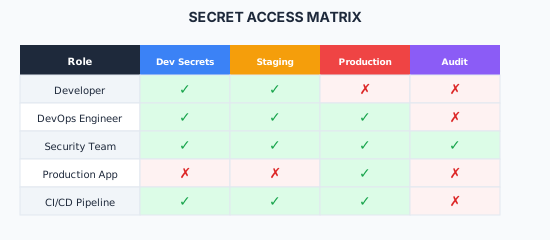
IAM Policy Example (AWS)
{
  "Version": "2012-10-17",
  "Statement": [
    {
      "Effect": "Allow",
      "Action": [
        "secretsmanager:GetSecretValue"
      ],
      "Resource": [
        "arn:aws:secretsmanager:us-east-1:123456789:secret:prod/*"
      ],
      "Condition": {
        "StringEquals": {
          "aws:PrincipalTag/Environment": "production"
        }
      }
    }
  ]
}
Auditing Secret Access
What to Log
| Event | Details to Capture |
|---|---|
| Secret Read | Who, when, which secret, source IP |
| Secret Write | Who, when, which secret, old/new version |
| Secret Rotation | When, which secret, success/failure |
| Access Denied | Who, when, which secret, reason |
| Policy Change | Who, when, old/new policy |
AWS CloudTrail Events
{
  "eventSource": "secretsmanager.amazonaws.com",
  "eventName": "GetSecretValue",
  "userIdentity": {
    "type": "AssumedRole",
    "arn": "arn:aws:sts::123456789:assumed-role/app-role/i-1234567890"
  },
  "requestParameters": {
    "secretId": "prod/database/password"
  },
  "responseElements": null,
  "eventTime": "2024-01-15T10:30:00Z"
}
Best Practices
Do
- Use a dedicated secrets management solution
- Rotate secrets regularly (90 days or less)
- Use different secrets per environment
- Implement least privilege access
- Enable audit logging for all secret access
- Scan code and commits for leaked secrets
- Use short-lived credentials when possible
- Encrypt secrets at rest and in transit
Don't
- Commit secrets to version control
- Share secrets via email, Slack, or tickets
- Use the same secret across environments
- Store secrets in plain text anywhere
- Give broad access to production secrets
- Skip rotation because it's "difficult"
- Log secret values (even accidentally)
- Hardcode secrets in container images
Emergency Response
If a Secret is Compromised
- Immediately rotate the compromised secret
- Revoke any sessions using the old secret
- Audit access logs for unauthorized use
- Scan for the secret in code/configs
- Update all systems using the secret
- Document the incident
- Review how the exposure occurred
# Example: AWS key rotation
aws secretsmanager rotate-secret --secret-id prod/api-key

# Force immediate expiration of tokens
aws iam update-access-key --access-key-id AKIAEXAMPLE --status Inactive
Related Resources
- Security Overview
- Secure Coding
- Vulnerability Scanning
- AWS Secrets Manager
- HashiCorp Vault
- Microsoft: Secrets Management
- detect-secrets - Yelp's secret detection tool
- gitleaks - Secret scanning for git repositories
Compliance
This section fulfills ISO 13485 requirements for control of records (4.2.4) and infrastructure (6.3), and ISO 27001 requirements for cryptography (A.8.24), access control (A.5.15), and privileged access management (A.8.18).
How is this guide?
Last updated on