
Dashboards
Creating effective dashboards for monitoring, alerting, and incident response
Dashboards provide visual representations of your system's health, enabling quick understanding of status and rapid incident response. Well-designed dashboards are essential for both operations and compliance.
Dashboard Design Principles
The Hierarchy of Information
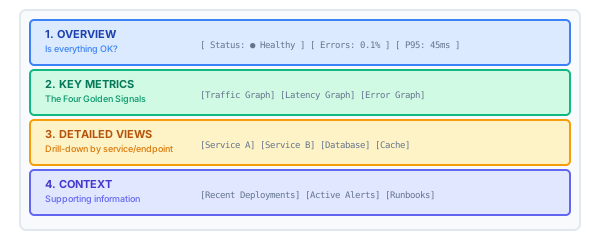
Dashboard Types
| Type | Purpose | Refresh Rate | Audience |
|---|---|---|---|
| Overview | Overall system health | 30s-1m | Everyone |
| Service | Single service details | 15s-30s | Service team |
| Incident | Debugging during outages | 10s-15s | On-call |
| Business | Business metrics | 5m-1h | Stakeholders |
| Compliance | Audit evidence | 1h-24h | Auditors |
Overview Dashboard
Essential Panels
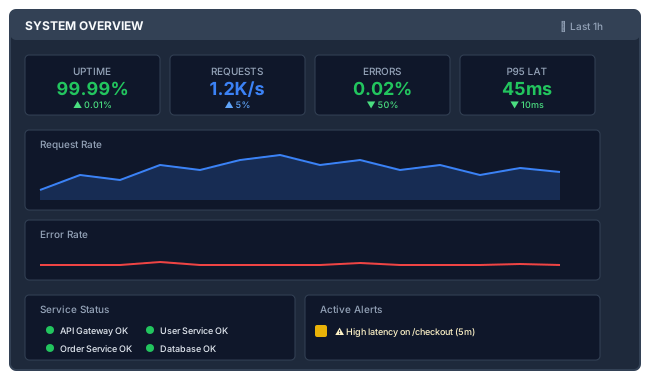
Grafana JSON Example
{
  "dashboard": {
    "title": "System Overview",
    "tags": ["overview", "production"],
    "timezone": "browser",
    "refresh": "30s",
    "panels": [
      {
        "type": "stat",
        "title": "Uptime",
        "targets": [
          {
            "expr": "avg(up) * 100",
            "legendFormat": "Uptime %"
          }
        ],
        "fieldConfig": {
          "defaults": {
            "unit": "percent",
            "thresholds": {
              "steps": [
                { "color": "red", "value": 0 },
                { "color": "yellow", "value": 99 },
                { "color": "green", "value": 99.9 }
              ]
            }
          }
        }
      },
      {
        "type": "timeseries",
        "title": "Request Rate",
        "targets": [
          {
            "expr": "sum(rate(http_requests_total[5m]))",
            "legendFormat": "Requests/s"
          }
        ]
      }
    ]
  }
}
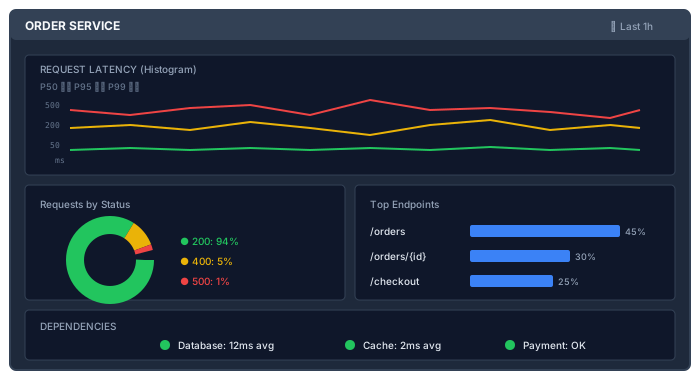
Service Dashboard
Per-Service Metrics
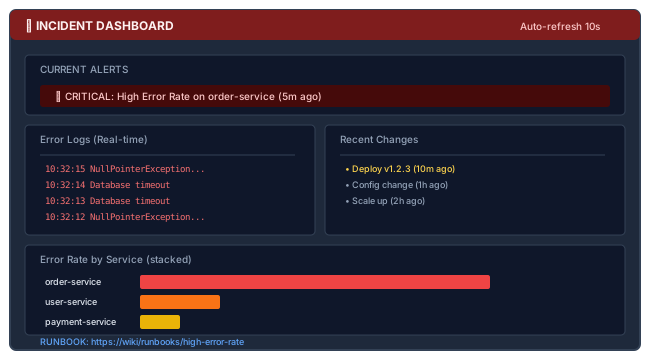
Incident Dashboard
Designed for Rapid Debugging
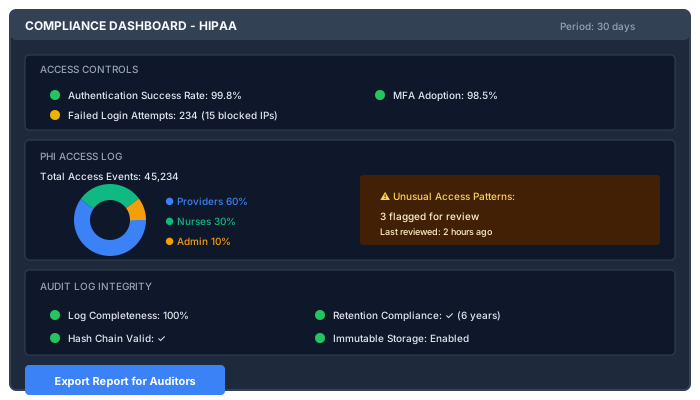
Compliance Dashboard
Audit Evidence Visualization
Dashboard Best Practices
Visual Design
| Principle | Implementation |
|---|---|
| Glanceability | Key metrics visible without scrolling |
| Consistency | Same colors mean the same things |
| Context | Show thresholds and baselines |
| Progressive disclosure | Overview → Details on click |
| Actionability | Link to runbooks from alerts |
Color Coding
🟢 Green  = Good / Within threshold
🟡 Yellow = Warning / Degraded
🔴 Red    = Critical / Failure
🔵 Blue   = Informational / Neutral
⚪ Gray   = No data / Unknown
Time Ranges
| Use Case | Time Range |
|---|---|
| Incident investigation | Last 1-6 hours |
| Daily operations | Last 24 hours |
| Trend analysis | Last 7 days |
| Capacity planning | Last 30 days |
| Compliance reporting | Last 90 days |
Alerting from Dashboards
Alert Annotations
{
  "alert": {
    "name": "High Error Rate",
    "conditions": [
      {
        "evaluator": {
          "type": "gt",
          "params": [0.05]
        },
        "query": {
          "params": ["A", "5m", "now"]
        },
        "reducer": {
          "type": "avg"
        }
      }
    ],
    "notifications": [
      { "uid": "slack-channel" },
      { "uid": "pagerduty" }
    ],
    "message": "Error rate is {{ $value }}%. Check runbook: https://wiki/runbooks/errors"
  }
}
Alert Thresholds on Graphs
Show thresholds directly on time series:
{
  "fieldConfig": {
    "defaults": {
      "custom": {
        "thresholdsStyle": {
          "mode": "line+area"
        }
      },
      "thresholds": {
        "steps": [
          { "color": "green", "value": null },
          { "color": "yellow", "value": 100 },
          { "color": "red", "value": 500 }
        ]
      }
    }
  }
}
Dashboard as Code
Terraform/Pulumi
# Grafana dashboard via Terraform
resource "grafana_dashboard" "overview" {
  config_json = file("dashboards/overview.json")
  folder      = grafana_folder.production.id
}

resource "grafana_folder" "production" {
  title = "Production"
}
Jsonnet/Grafonnet
local grafana = import 'grafonnet/grafana.libsonnet';
local dashboard = grafana.dashboard;
local prometheus = grafana.prometheus;
local graphPanel = grafana.graphPanel;

dashboard.new(
  'Service Overview',
  schemaVersion=16,
  tags=['production'],
  time_from='now-1h',
  refresh='30s',
)
.addPanel(
  graphPanel.new(
    'Request Rate',
    datasource='Prometheus',
  )
  .addTarget(
    prometheus.target(
      'sum(rate(http_requests_total[5m]))',
      legendFormat='Requests/s',
    )
  ),
  gridPos={ x: 0, y: 0, w: 12, h: 8 },
)
Dashboard Checklist
Before Publishing
- Title and description are clear
- Time range selector is appropriate
- Variables allow filtering (environment, service)
- Panels have clear titles and units
- Colors are consistent and meaningful
- Thresholds are visible on graphs
- Links to related dashboards exist
- Runbook links are included for alerts
For Compliance
- Audit trail metrics are visible
- Access patterns can be reviewed
- Data retention status is shown
- Export functionality for reports
- Change history is tracked
Related Resources
Compliance
This section fulfills ISO 13485 requirements for monitoring and measurement (8.2.4) and data analysis (8.4), and ISO 27001 requirements for monitoring activities (A.8.16), event logging (A.8.15), and operational security (A.8.9).
How is this guide?
Last updated on