
Infrastructure as Code
Managing infrastructure through version-controlled configuration files
Infrastructure as Code (IaC) is the practice of managing and provisioning infrastructure through machine-readable configuration files rather than manual processes. IaC enables consistent, repeatable, and auditable infrastructure deployments.
What is Infrastructure as Code?
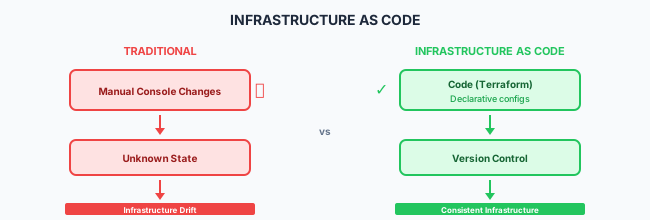
IaC Benefits
| Benefit | Description |
|---|---|
| Consistency | Same code produces same infrastructure |
| Version Control | Track changes, review, rollback |
| Automation | Eliminate manual provisioning |
| Documentation | Code serves as documentation |
| Testing | Validate infrastructure before deployment |
| Compliance | Audit trail for all changes |
IaC Tools Comparison
| Tool | Type | Language | Cloud Support |
|---|---|---|---|
| Terraform | Declarative | HCL | Multi-cloud |
| Pulumi | Imperative | TypeScript, Python, Go | Multi-cloud |
| CloudFormation | Declarative | YAML/JSON | AWS only |
| Azure Bicep | Declarative | Bicep | Azure only |
| Ansible | Configuration | YAML | Multi-cloud |
Terraform Fundamentals
Basic Structure
# main.tf
terraform {
  required_version = ">= 1.0"
  required_providers {
    aws = {
      source  = "hashicorp/aws"
      version = "~> 5.0"
    }
  }

  backend "s3" {
    bucket = "my-terraform-state"
    key    = "prod/terraform.tfstate"
    region = "us-east-1"
  }
}

provider "aws" {
  region = var.aws_region
}
Variables
# variables.tf
variable "aws_region" {
  description = "AWS region for resources"
  type        = string
  default     = "us-east-1"
}

variable "environment" {
  description = "Environment name"
  type        = string
  validation {
    condition     = contains(["dev", "staging", "prod"], var.environment)
    error_message = "Environment must be dev, staging, or prod."
  }
}

variable "instance_config" {
  description = "EC2 instance configuration"
  type = object({
    instance_type = string
    volume_size   = number
  })
  default = {
    instance_type = "t3.micro"
    volume_size   = 20
  }
}
Resources
# resources.tf
resource "aws_vpc" "main" {
  cidr_block           = "10.0.0.0/16"
  enable_dns_hostnames = true
  enable_dns_support   = true

  tags = {
    Name        = "${var.environment}-vpc"
    Environment = var.environment
    ManagedBy   = "terraform"
  }
}

resource "aws_subnet" "public" {
  count             = 2
  vpc_id            = aws_vpc.main.id
  cidr_block        = "10.0.${count.index + 1}.0/24"
  availability_zone = data.aws_availability_zones.available.names[count.index]

  tags = {
    Name = "${var.environment}-public-${count.index + 1}"
  }
}

resource "aws_security_group" "web" {
  name        = "${var.environment}-web-sg"
  description = "Security group for web servers"
  vpc_id      = aws_vpc.main.id

  ingress {
    from_port   = 443
    to_port     = 443
    protocol    = "tcp"
    cidr_blocks = ["0.0.0.0/0"]
  }

  egress {
    from_port   = 0
    to_port     = 0
    protocol    = "-1"
    cidr_blocks = ["0.0.0.0/0"]
  }
}
Outputs
# outputs.tf
output "vpc_id" {
  description = "ID of the VPC"
  value       = aws_vpc.main.id
}

output "public_subnet_ids" {
  description = "IDs of public subnets"
  value       = aws_subnet.public[*].id
}

output "security_group_id" {
  description = "ID of the web security group"
  value       = aws_security_group.web.id
}
Terraform Modules
Module Structure
modules/
└── vpc/
    ├── main.tf
    ├── variables.tf
    ├── outputs.tf
    └── README.md
Creating a Module
# modules/vpc/main.tf
resource "aws_vpc" "this" {
  cidr_block           = var.cidr_block
  enable_dns_hostnames = var.enable_dns_hostnames
  enable_dns_support   = var.enable_dns_support

  tags = merge(var.tags, {
    Name = var.name
  })
}

# modules/vpc/variables.tf
variable "name" {
  type = string
}

variable "cidr_block" {
  type = string
}

variable "enable_dns_hostnames" {
  type    = bool
  default = true
}

variable "enable_dns_support" {
  type    = bool
  default = true
}

variable "tags" {
  type    = map(string)
  default = {}
}

# modules/vpc/outputs.tf
output "vpc_id" {
  value = aws_vpc.this.id
}
Using a Module
# main.tf
module "vpc" {
  source = "./modules/vpc"

  name       = "production-vpc"
  cidr_block = "10.0.0.0/16"

  tags = {
    Environment = "production"
    ManagedBy   = "terraform"
  }
}

# Reference module outputs
resource "aws_subnet" "public" {
  vpc_id     = module.vpc.vpc_id
  cidr_block = "10.0.1.0/24"
}
State Management
Remote State
# Backend configuration
terraform {
  backend "s3" {
    bucket         = "my-terraform-state"
    key            = "environments/prod/terraform.tfstate"
    region         = "us-east-1"
    encrypt        = true
    dynamodb_table = "terraform-locks"
  }
}
State Locking
# DynamoDB table for state locking
resource "aws_dynamodb_table" "terraform_locks" {
  name         = "terraform-locks"
  billing_mode = "PAY_PER_REQUEST"
  hash_key     = "LockID"

  attribute {
    name = "LockID"
    type = "S"
  }
}
Workspace Management
# Create and switch workspaces
terraform workspace new staging
terraform workspace new production
terraform workspace select staging

# Use workspace in configuration
locals {
  environment = terraform.workspace
}
Kubernetes Infrastructure
EKS Cluster
module "eks" {
  source  = "terraform-aws-modules/eks/aws"
  version = "~> 19.0"

  cluster_name    = "${var.environment}-cluster"
  cluster_version = "1.28"

  vpc_id     = module.vpc.vpc_id
  subnet_ids = module.vpc.private_subnet_ids

  eks_managed_node_groups = {
    general = {
      desired_size = 2
      min_size     = 1
      max_size     = 4

      instance_types = ["t3.medium"]
      capacity_type  = "ON_DEMAND"
    }
  }

  tags = local.tags
}
Kubernetes Resources with Terraform
provider "kubernetes" {
  host                   = module.eks.cluster_endpoint
  cluster_ca_certificate = base64decode(module.eks.cluster_certificate_authority_data)

  exec {
    api_version = "client.authentication.k8s.io/v1beta1"
    command     = "aws"
    args        = ["eks", "get-token", "--cluster-name", module.eks.cluster_name]
  }
}

resource "kubernetes_namespace" "app" {
  metadata {
    name = var.app_namespace
    labels = {
      environment = var.environment
    }
  }
}

resource "kubernetes_deployment" "app" {
  metadata {
    name      = "myapp"
    namespace = kubernetes_namespace.app.metadata[0].name
  }

  spec {
    replicas = var.replicas

    selector {
      match_labels = {
        app = "myapp"
      }
    }

    template {
      metadata {
        labels = {
          app = "myapp"
        }
      }

      spec {
        container {
          name  = "myapp"
          image = "${var.image_repository}:${var.image_tag}"

          port {
            container_port = 8080
          }

          resources {
            limits = {
              cpu    = "500m"
              memory = "512Mi"
            }
            requests = {
              cpu    = "250m"
              memory = "256Mi"
            }
          }
        }
      }
    }
  }
}
CI/CD Integration
Terraform in GitHub Actions
name: Terraform
on:
  push:
    branches: [main]
    paths: ['terraform/**']
  pull_request:
    paths: ['terraform/**']

jobs:
  terraform:
    runs-on: ubuntu-latest
    defaults:
      run:
        working-directory: terraform

    steps:
      - uses: actions/checkout@v4

      - uses: hashicorp/setup-terraform@v3
        with:
          terraform_version: 1.6.0

      - name: Terraform Init
        run: terraform init

      - name: Terraform Format
        run: terraform fmt -check

      - name: Terraform Validate
        run: terraform validate

      - name: Terraform Plan
        run: terraform plan -out=tfplan
        env:
          AWS_ACCESS_KEY_ID: ${{ secrets.AWS_ACCESS_KEY_ID }}
          AWS_SECRET_ACCESS_KEY: ${{ secrets.AWS_SECRET_ACCESS_KEY }}

      - name: Terraform Apply
        if: github.ref == 'refs/heads/main' && github.event_name == 'push'
        run: terraform apply -auto-approve tfplan
        env:
          AWS_ACCESS_KEY_ID: ${{ secrets.AWS_ACCESS_KEY_ID }}
          AWS_SECRET_ACCESS_KEY: ${{ secrets.AWS_SECRET_ACCESS_KEY }}
Automated Security Scanning
- name: Run tfsec
  uses: aquasecurity/tfsec-action@v1.0.0
  with:
    working_directory: terraform

- name: Run Checkov
  uses: bridgecrewio/checkov-action@v12
  with:
    directory: terraform
    framework: terraform
Best Practices
File Organization
infrastructure/
├── environments/
│   ├── dev/
│   │   ├── main.tf
│   │   ├── variables.tf
│   │   └── terraform.tfvars
│   ├── staging/
│   │   └── ...
│   └── prod/
│       └── ...
├── modules/
│   ├── vpc/
│   ├── eks/
│   └── rds/
└── shared/
    └── backend.tf
Naming Conventions
# Resource naming
resource "aws_s3_bucket" "logs" {
  bucket = "${var.project}-${var.environment}-logs"
}

# Consistent tagging
locals {
  common_tags = {
    Project     = var.project
    Environment = var.environment
    ManagedBy   = "terraform"
    Owner       = var.owner
  }
}
Do
- Use remote state with locking
- Implement modular design
- Version pin providers
- Use consistent naming
- Tag all resources
- Scan for security issues
- Review plans before apply
Don't
- Store state locally
- Hardcode credentials
- Skip the plan step
- Make manual changes
- Ignore security warnings
- Use latest provider versions
Related Resources
- CI/CD Overview
- Continuous Delivery
- DevSecOps
- Terraform Documentation
- Microsoft Playbook: Infrastructure as Code
Compliance
This section fulfills ISO 13485 requirements for infrastructure (6.3), control of production (7.5.1), and control of records (4.2.4), and ISO 27001 requirements for configuration management (A.8.9), change management (A.8.32), and secure architecture (A.8.27).
How is this guide?
Last updated on