
Test Automation
Strategies for automating tests in CI/CD pipelines and development workflows
Test automation is essential for maintaining quality at scale. This guide covers automation strategies, CI/CD integration, and best practices for building reliable automated test suites.
Test Automation Strategy
The Automation Pyramid
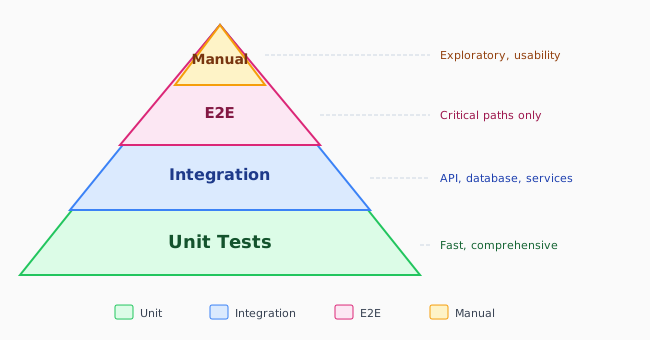
What to Automate
| Automate | Don't Automate |
|---|---|
| Regression tests | Exploratory testing |
| Smoke tests | One-time verifications |
| Data validation | Usability testing |
| API contracts | Visual design review |
| Security checks | Complex edge cases |
| Performance baselines | Infrequent scenarios |
CI/CD Integration
Test Execution Stages
# .github/workflows/test.yml
name: Test Pipeline

on: [push, pull_request]

jobs:
  # Stage 1: Fast feedback (< 5 min)
  lint-and-unit:
    runs-on: ubuntu-latest
    steps:
      - uses: actions/checkout@v4
      - uses: actions/setup-node@v4
      - run: npm ci
      - run: npm run lint
      - run: npm run test:unit -- --coverage
      - uses: codecov/codecov-action@v3

  # Stage 2: Integration (< 15 min)
  integration:
    needs: lint-and-unit
    runs-on: ubuntu-latest
    services:
      postgres:
        image: postgres:15
        env:
          POSTGRES_PASSWORD: test
        options: >-
          --health-cmd pg_isready
          --health-interval 10s
    steps:
      - uses: actions/checkout@v4
      - uses: actions/setup-node@v4
      - run: npm ci
      - run: npm run test:integration
        env:
          DATABASE_URL: postgres://postgres:test@localhost:5432/test

  # Stage 3: E2E (< 30 min)
  e2e:
    needs: integration
    runs-on: ubuntu-latest
    steps:
      - uses: actions/checkout@v4
      - uses: actions/setup-node@v4
      - run: npm ci
      - run: npx playwright install --with-deps
      - run: npm run build
      - run: npm run test:e2e
      - uses: actions/upload-artifact@v4
        if: failure()
        with:
          name: playwright-report
          path: playwright-report/
Parallel Test Execution
# Run tests in parallel shards
e2e:
  strategy:
    matrix:
      shard: [1, 2, 3, 4]
  steps:
    - run: npx playwright test --shard=${{ matrix.shard }}/4
Pre-Commit Hooks
Husky + lint-staged Configuration
// package.json
{
  "scripts": {
    "prepare": "husky install"
  },
  "lint-staged": {
    "*.{js,ts,tsx}": [
      "eslint --fix",
      "prettier --write"
    ],
    "*.{ts,tsx}": [
      "bash -c 'npm run test:unit -- --findRelatedTests --passWithNoTests'"
    ]
  }
}
# .husky/pre-commit
#!/bin/sh
. "$(dirname "$0")/_/husky.sh"
npx lint-stagedPre-Push Hooks
# .husky/pre-push
#!/bin/sh
. "$(dirname "$0")/_/husky.sh"

npm run test:unit
npm run test:integration
Test Data Management
Factories and Fixtures
// factories/user.factory.ts
import { faker } from '@faker-js/faker';

export const createUserFactory = (overrides = {}) => ({
  id: faker.string.uuid(),
  name: faker.person.fullName(),
  email: faker.internet.email(),
  role: 'user',
  createdAt: new Date(),
  ...overrides,
});

export const createAdminFactory = (overrides = {}) =>
  createUserFactory({ role: 'admin', ...overrides });

// Usage
const user = createUserFactory();
const admin = createAdminFactory({ name: 'Admin User' });
Database Seeding
// seeds/test-data.ts
import { PrismaClient } from '@prisma/client';
import { createUserFactory } from '../factories/user.factory';

const prisma = new PrismaClient();

async function seed() {
  // Clean existing data
  await prisma.user.deleteMany();

  // Create test users
  const users = Array.from({ length: 10 }, () => createUserFactory());

  await prisma.user.createMany({ data: users });

  // Create admin
  await prisma.user.create({
    data: createUserFactory({ email: 'admin@test.com', role: 'admin' }),
  });

  console.log('Seeded test database');
}

seed()
  .catch(console.error)
  .finally(() => prisma.$disconnect());
Test Environment Management
Docker Compose for Tests
# docker-compose.test.yml
version: '3.8'

services:
  app:
    build:
      context: .
      dockerfile: Dockerfile.test
    environment:
      - NODE_ENV=test
      - DATABASE_URL=postgres://test:test@db:5432/test
      - REDIS_URL=redis://redis:6379
    depends_on:
      db:
        condition: service_healthy
      redis:
        condition: service_started

  db:
    image: postgres:15
    environment:
      POSTGRES_USER: test
      POSTGRES_PASSWORD: test
      POSTGRES_DB: test
    healthcheck:
      test: ["CMD-SHELL", "pg_isready -U test"]
      interval: 5s
      timeout: 5s
      retries: 5

  redis:
    image: redis:7
Environment Isolation
// config/test.ts
export const testConfig = {
  database: {
    url: process.env.TEST_DATABASE_URL || 'postgres://test:test@localhost:5433/test',
  },
  redis: {
    url: process.env.TEST_REDIS_URL || 'redis://localhost:6380',
  },
  api: {
    baseUrl: process.env.TEST_API_URL || 'http://localhost:3001',
  },
  // Disable external services in tests
  external: {
    enabled: false,
    mockResponses: true,
  },
};
Test Reporting
JUnit XML Reports
// jest.config.js
module.exports = {
  reporters: [
    'default',
    ['jest-junit', {
      outputDirectory: 'reports',
      outputName: 'junit.xml',
      classNameTemplate: '{classname}',
      titleTemplate: '{title}',
    }],
  ],
};
HTML Reports
// playwright.config.ts
export default {
  reporter: [
    ['html', { outputFolder: 'playwright-report' }],
    ['junit', { outputFile: 'results/junit.xml' }],
    ['json', { outputFile: 'results/results.json' }],
  ],
};
Custom Reporting
// custom-reporter.ts
import { Reporter, TestCase, TestResult } from '@playwright/test/reporter';

class CustomReporter implements Reporter {
  private results: Array<{ name: string; status: string; duration: number }> = [];

  onTestEnd(test: TestCase, result: TestResult) {
    this.results.push({
      name: test.title,
      status: result.status,
      duration: result.duration,
    });
  }

  async onEnd() {
    // Send to external system
    await fetch('https://metrics.example.com/tests', {
      method: 'POST',
      body: JSON.stringify(this.results),
    });
  }
}

export default CustomReporter;
Flaky Test Management
Detecting Flaky Tests
# Run tests multiple times to detect flakiness
flaky-detection:
  runs-on: ubuntu-latest
  steps:
    - uses: actions/checkout@v4
    - run: npm ci
    - name: Run tests multiple times
      run: |
        for i in {1..5}; do
          npm run test:e2e 2>&1 | tee -a test-output-$i.log
        done
    - name: Check for inconsistent results
      run: |
        if ! diff test-output-1.log test-output-2.log > /dev/null; then
          echo "Flaky tests detected!"
          exit 1
        fi
Quarantining Flaky Tests
// Playwright: Skip flaky tests
test.skip('flaky test that needs fixing', async ({ page }) => {
  // ...
});

// Jest: Mark as flaky
test.todo('flaky test - needs investigation');

// Or use conditional skip
const isFlaky = process.env.SKIP_FLAKY === 'true';
test.skipIf(isFlaky)('potentially flaky test', () => {
  // ...
});
Retry Configuration
// playwright.config.ts
export default {
  retries: process.env.CI ? 2 : 0,
  // Report flaky tests
  reporter: [
    ['html'],
    ['./flaky-reporter.ts'],
  ],
};
Test Maintenance
Test Organization
tests/
├── unit/
│   └── *.test.ts           # Fast, isolated
├── integration/
│   └── *.integration.test.ts  # Database, APIs
├── e2e/
│   └── *.e2e.test.ts       # Full workflows
├── fixtures/
│   └── *.json              # Test data
├── factories/
│   └── *.factory.ts        # Data generators
├── helpers/
│   └── *.helper.ts         # Test utilities
└── mocks/
    └── *.mock.ts           # Service mocks
Cleaning Up Tests
// Global test cleanup
afterEach(async () => {
  jest.clearAllMocks();
  jest.useRealTimers();
});

afterAll(async () => {
  await prisma.$disconnect();
  await redis.quit();
});

// Playwright cleanup
test.afterEach(async ({ page }) => {
  // Clear local storage
  await page.evaluate(() => localStorage.clear());

  // Clear cookies
  await page.context().clearCookies();
});
Automation Best Practices
Do
- Run fast tests first for quick feedback
- Parallelize test execution where possible
- Use meaningful test names and descriptions
- Keep test data isolated and reproducible
- Monitor test execution times
- Regularly review and remove obsolete tests
Don't
- Run full E2E suite on every commit
- Share state between tests
- Depend on external services without mocking
- Ignore test failures (fix or remove)
- Hard-code dates, times, or random values
- Skip writing tests to meet deadlines
Metrics to Track
| Metric | Target | Action if Exceeded |
|---|---|---|
| Test Suite Duration | < 10 min | Parallelize, optimize |
| Flaky Test Rate | < 1% | Fix or quarantine |
| Code Coverage | > 80% | Add tests for gaps |
| Test-to-Code Ratio | 1:1 to 2:1 | Review test quality |
| Failed Builds due to Tests | < 5% | Improve reliability |
Related Resources
Compliance
This section fulfills ISO 13485 requirements for control of production (7.5.1) and monitoring and measurement (8.2.4), and ISO 27001 requirements for secure development lifecycle (A.8.25) and security testing (A.8.29).
How is this guide?
Last updated on