
Checklists
Standardized checklists for quality assurance, accessibility, security, and compliance
Checklists are essential tools for ensuring consistency and completeness in software development. They reduce errors, support compliance requirements, and help teams maintain high quality standards across projects.
Why Use Checklists
| Benefit | Description |
|---|---|
| Consistency | Same criteria applied every time |
| Completeness | Nothing important gets missed |
| Efficiency | Quick verification without deep analysis |
| Compliance | Evidence of due diligence |
| Knowledge Transfer | Captures team expertise |
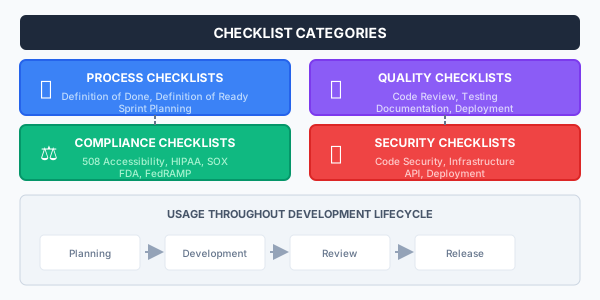
Checklist Categories
Checklist Best Practices
Creating Effective Checklists
-
Keep items specific and actionable
- Bad: "Check security"
- Good: "Verify all user inputs are validated and sanitized"
-
Group related items logically
- Organize by category, phase, or component
- Use consistent ordering
-
Include verification methods
- Specify how to verify each item
- Reference testing procedures when applicable
-
Maintain version control
- Track changes to checklists
- Review and update periodically
Checklist Identifier Format
For traceability, use structured identifiers:
FORMAT: CATEGORY-MODULE-00000-00a0-00

Examples:
- ARCH_GEN_00001_00a0_00 (Architecture, General, Item 1a)
- SEC_API_00005_00b0_00 (Security, API, Item 5b)
- ACC_WEB_00010_00c0_00 (Accessibility, Web, Item 10c)

Components:
- Category: 3-8 alpha chars (ARCH, DEV, SEC, etc.)
- Module: 3-8 alpha chars (specific area)
- Checklist: 5 digits, zero-padded
- Item: 3 chars + digit (allows insertion)
- Version: 2 digits, zero-padded
Available Checklists
| Checklist | Purpose | When to Use |
|---|---|---|
| Definition of Done | Story completion criteria | End of each user story |
| Definition of Ready | Story readiness criteria | Sprint planning |
| 508 Accessibility | Accessibility compliance | UI development, testing |
| Security Checklists | Security review criteria | Code reviews, deployments |
| Compliance Checklists | Regulatory requirements | Audit preparation, releases |
Using Checklists in Development
During Sprint Planning
┌─────────────────────────────────────────────────────────────────────────────┐
│                        SPRINT PLANNING CHECKLIST                             │
├─────────────────────────────────────────────────────────────────────────────┤
│ □ All stories meet Definition of Ready                                      │
│ □ Acceptance criteria are clear and testable                                │
│ □ Dependencies are identified and addressed                                  │
│ □ Estimates are based on team capacity                                       │
│ □ Security and compliance requirements identified                            │
│ □ Testing approach defined                                                   │
└─────────────────────────────────────────────────────────────────────────────┘
During Development
┌─────────────────────────────────────────────────────────────────────────────┐
│                        CODE REVIEW CHECKLIST                                 │
├─────────────────────────────────────────────────────────────────────────────┤
│ □ Code follows project style guidelines                                      │
│ □ Functions are appropriately sized and focused                              │
│ □ Error handling is comprehensive                                            │
│ □ Security vulnerabilities checked (OWASP Top 10)                           │
│ □ Tests cover new functionality                                              │
│ □ Documentation updated where needed                                         │
└─────────────────────────────────────────────────────────────────────────────┘
Before Release
┌─────────────────────────────────────────────────────────────────────────────┐
│                        RELEASE CHECKLIST                                     │
├─────────────────────────────────────────────────────────────────────────────┤
│ □ All tests passing                                                          │
│ □ Security scan completed with no critical issues                            │
│ □ Accessibility testing completed                                            │
│ □ Documentation updated                                                      │
│ □ Release notes prepared                                                     │
│ □ Rollback procedure verified                                                │
│ □ Stakeholder approval obtained                                              │
└─────────────────────────────────────────────────────────────────────────────┘
Automating Checklists
CI/CD Integration
Many checklist items can be automated:
# Example: Automated checklist in CI pipeline
checklist:
  code_quality:
    - name: "Linting passes"
      command: npm run lint
    - name: "Unit tests pass"
      command: npm test
    - name: "No critical vulnerabilities"
      command: npm audit --audit-level=critical

  security:
    - name: "SAST scan clean"
      command: ./scripts/sast-scan.sh
    - name: "Secrets detection"
      command: ./scripts/detect-secrets.sh

  accessibility:
    - name: "Axe accessibility scan"
      command: npm run a11y-test
Manual Verification
Some items require human judgment:
- Code review thoroughness
- Design appropriateness
- User experience quality
- Documentation clarity
- Compliance interpretation
Related Resources
- Definition of Done
- Definition of Ready
- Code Reviews
- Automated Testing
- Microsoft Playbook: Agile Development
Compliance
This section fulfills ISO 13485 requirements for control of records (4.2.4), planning of product realization (7.1), control of production (7.5.1), and monitoring and measurement (8.2.4, 8.2.6), and ISO 27001 requirements for compliance verification (A.5.36), documented procedures (A.5.37), vulnerability management (A.8.8), secure development (A.8.25), and security testing (A.8.29).
How is this guide?
Last updated on