
FDA QSR Guidelines
FDA Quality System Regulation compliance for medical device software
The FDA Quality System Regulation (21 CFR Part 820) establishes requirements for medical device manufacturers, including software as a medical device (SaMD) and software in medical devices (SiMD). This guideline covers software development requirements for FDA compliance.
FDA Software Regulations
Applicable Regulations
| Regulation | Description |
|---|---|
| 21 CFR Part 820 | Quality System Regulation |
| 21 CFR Part 11 | Electronic Records and Signatures |
| IEC 62304 | Medical Device Software Lifecycle |
| ISO 14971 | Risk Management for Medical Devices |
Software Classification
| Class | Risk Level | Examples | Rigor Required |
|---|---|---|---|
| Class A | No injury possible | Admin tools, data transfer | Minimal |
| Class B | Non-serious injury | Monitoring, alerts | Moderate |
| Class C | Death/serious injury | Treatment control, diagnosis | Maximum |
Design Controls (21 CFR 820.30)
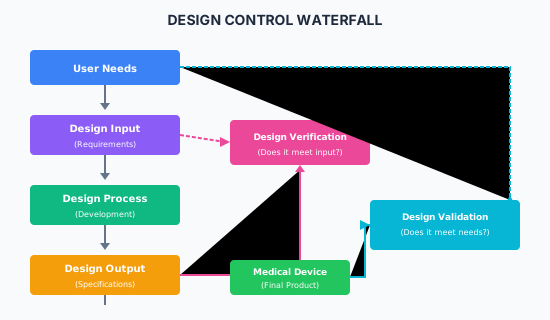
Design Input
Requirements must be:
- Complete and unambiguous
- Addressing user needs
- Including regulatory requirements
- Approved before development
## Requirement: REQ-001

**Title:** Patient Vital Signs Display
**Type:** Functional
**Source:** User Needs Document, Section 3.2
**Priority:** Essential

### Description
The system shall display patient vital signs (heart rate, blood pressure,
oxygen saturation) in real-time with updates every 2 seconds.

### Acceptance Criteria
1. Heart rate displayed in BPM (range: 30-250)
2. Blood pressure displayed in mmHg (systolic/diastolic)
3. SpO2 displayed as percentage (range: 50-100%)
4. Update latency < 500ms from sensor reading
5. Visual and audio alarms for out-of-range values

### Risk Reference
RISK-015: Delayed vital sign display may delay intervention

### Traceability
- User Need: UN-042
- Test Cases: TC-001, TC-002, TC-003
Design Output
## Software Design Specification: SDS-001

**Related Requirement:** REQ-001
**Version:** 1.2
**Author:** John Smith
**Approved:** Jane Doe (2024-01-15)

### Architecture
[Component diagram showing data flow from sensors to display]

### Interface Specification
```typescript
interface VitalSigns {
  heartRate: number;      // BPM, 30-250
  systolic: number;       // mmHg, 60-200
  diastolic: number;      // mmHg, 40-140
  spO2: number;           // %, 50-100
  timestamp: Date;
}

interface DisplayConfig {
  updateIntervalMs: 2000;
  alarmThresholds: AlarmConfig;
}
Error Handling
[Error states and recovery procedures]
Verification Method
Unit tests, integration tests, simulated sensor data
### Design Verification
Verify that design outputs meet design inputs:
| Input Requirement | Output Specification | Verification Method | Result |
|-------------------|---------------------|---------------------|--------|
| REQ-001 | SDS-001 | Unit Test UT-001 | PASS |
| REQ-002 | SDS-002 | Integration Test IT-001 | PASS |
### Design Validation
Validate that the device meets user needs:
| User Need | Test Protocol | Participants | Result |
|-----------|---------------|--------------|--------|
| UN-042 | VP-001 | 10 clinicians | Validated |
| UN-043 | VP-002 | 8 nurses | Validated |
---
## Software Development Lifecycle (IEC 62304)
### Required Activities by Class
| Activity | Class A | Class B | Class C |
|----------|---------|---------|---------|
| Software development planning | ✓ | ✓ | ✓ |
| Software requirements analysis | ✓ | ✓ | ✓ |
| Software architecture design | - | ✓ | ✓ |
| Software detailed design | - | - | ✓ |
| Software unit implementation | ✓ | ✓ | ✓ |
| Software unit verification | - | ✓ | ✓ |
| Software integration | ✓ | ✓ | ✓ |
| Software integration testing | - | ✓ | ✓ |
| Software system testing | ✓ | ✓ | ✓ |
| Software release | ✓ | ✓ | ✓ |
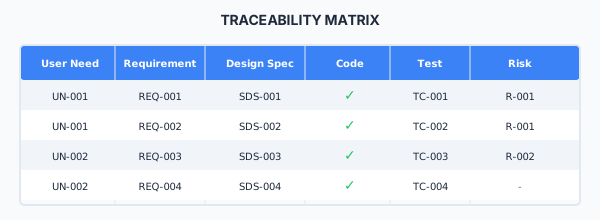
### Traceability Matrix
---
## Risk Management (ISO 14971)
### Risk Analysis
| Hazard | Harm | Severity | Probability | Risk Level | Mitigation |
|--------|------|----------|-------------|------------|------------|
| Incorrect dose calculation | Patient injury | 4 | 3 | High | Redundant calculation, validation |
| Display failure | Delayed treatment | 3 | 2 | Medium | Alarm system, redundant display |
| Data corruption | Wrong patient data | 4 | 1 | Medium | Checksums, verification |
### FMEA Example
```markdown
## Failure Mode: Software crash during operation
**Effect:** Display goes blank, no vital signs shown
**Cause:** Memory leak, unhandled exception
**Severity:** 4 (Serious)
**Occurrence:** 2 (Low)
**Detection:** 3 (Moderate - watchdog timer)
**RPN:** 24
### Mitigation Measures
1. Implement watchdog timer with auto-restart (D: 2)
2. Conduct code review for memory management (O: 1)
3. Add exception handling throughout (O: 1)
**Post-Mitigation RPN:** 8Documentation Requirements
Design History File (DHF)
The DHF must contain:
| Document | Description |
|---|---|
| Design and development plan | Project plan with milestones |
| Design input | Requirements specifications |
| Design output | Design specifications, code |
| Design review records | Meeting minutes, decisions |
| Design verification results | Test reports, analysis |
| Design validation results | Clinical/user evaluation |
| Design transfer records | Manufacturing release |
| Change control records | All design changes |
| Risk management file | Hazard analysis, FMEA |
21 CFR Part 11 Compliance
For electronic records and signatures:
| Requirement | Implementation |
|---|---|
| Audit trails | All changes logged with timestamp, user, reason |
| Electronic signatures | Unique to each user, intention captured |
| Access controls | Role-based, authenticated |
| System validation | Documented validation of systems |
| Record retention | Secure, accessible for required period |
Development Checklist
Planning
- Define software safety classification
- Create software development plan
- Establish configuration management
- Define verification and validation strategy
- Create risk management plan
Requirements
- Capture all user needs
- Define functional requirements
- Define non-functional requirements
- Include safety requirements
- Establish traceability
Design
- Create architecture documentation
- Document detailed design (Class C)
- Conduct design reviews
- Update risk analysis
Implementation
- Follow coding standards
- Conduct code reviews
- Manage configuration
- Document anomalies
Verification
- Execute unit tests (Class B/C)
- Execute integration tests (Class B/C)
- Execute system tests
- Document all test results
Validation
- Conduct validation with intended users
- Document validation results
- Confirm user needs are met
Release
- Complete DHF
- Verify traceability complete
- Obtain required approvals
- Archive all records
Related Resources
Compliance
This section fulfills ISO 13485 requirements for design controls (7.3), risk management (7.1), design verification (7.3.6), and design validation (7.3.7), and ISO 27001 requirements for secure development lifecycle (A.8.25), application security requirements (A.8.26), and security testing (A.8.29).
How is this guide?
Last updated on